
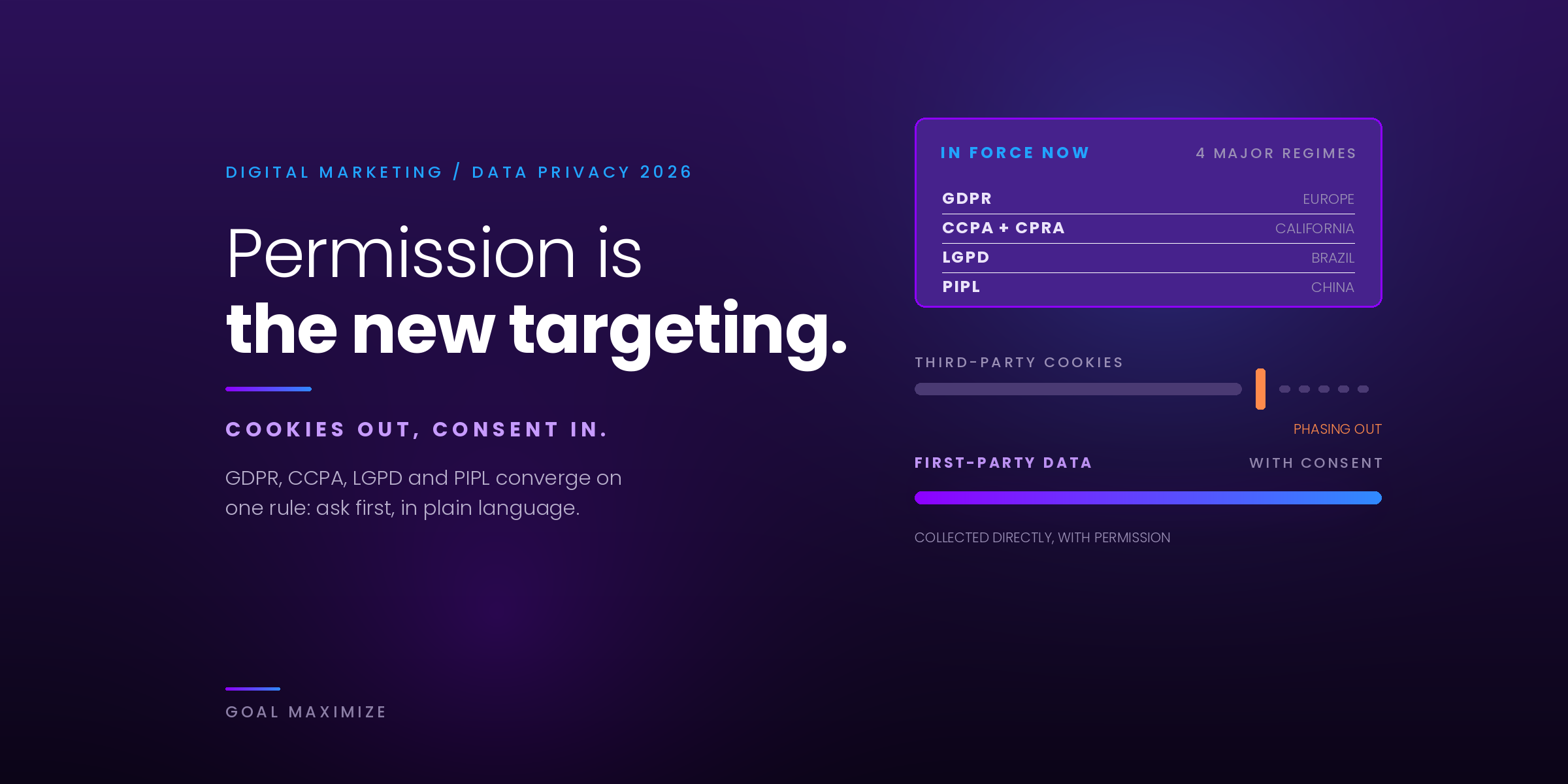
Every campaign you run depends on data about real people, and the rules about how you collect and use that data keep changing. A cookie banner that was fine two years ago can now put your digital marketing at risk, and a tracking setup that ignores consent can quietly break your Google Ads reporting.
This guide covers the laws that actually apply to marketers, how Google’s Consent Mode v2 works, how to build a cookie banner that stays compliant and still converts, and how first-party data and server-side tracking fit together. It ends with a checklist you can work through this week, and an FAQ.
Why Data Privacy Matters in Digital Marketing
People are more aware of how their data is used, and regulators are acting on that. Browsers like Safari and Firefox already block third-party cookies by default, and privacy laws now reach well beyond Europe. For marketers, that creates three practical problems:
- Legal exposure. Fines under the strictest laws are calculated as a share of global turnover, not a flat fee.
- Data gaps. When visitors decline tracking, your analytics and ad platforms see less. Without a plan, your reports and ad optimisation get worse.
- Trust. A clear, honest consent experience is part of how a brand looks to a first-time visitor.
The Laws That Apply to Your Marketing
You do not need to memorise every statute. You do need to know which ones reach your audience, because privacy laws follow the visitor, not the location of your office. An agency in India or a store in Texas that markets to people in Europe or California has to follow those rules for those people.
GDPR (European Union)
The General Data Protection Regulation has applied since 25 May 2018. For marketers, the core rule is that you need a lawful basis to use personal data, and for most advertising and non-essential cookies that basis is consent. Consent has to be freely given, specific, informed and unambiguous, and people must be able to withdraw it as easily as they gave it.
The penalties are tiered. Breaches of the core principles and consent rules can be fined up to €20 million or 4% of worldwide annual turnover, whichever is higher.
UK GDPR and PECR (United Kingdom)
The UK keeps its own version of GDPR, plus the Privacy and Electronic Communications Regulations (PECR), which cover cookies and email marketing. The Data (Use and Access) Act 2025 changed both. Its main provisions came into force on 5 February 2026, and two changes matter to marketers:
- A narrow analytics exemption. Cookies used only to produce statistics that improve your website can be exempt from consent, as long as you give clear information and a simple way to object. Advertising and personalisation cookies are not covered.
- Bigger fines. PECR penalties rose to the greater of £17.5 million or 4% of worldwide turnover, matching UK GDPR levels.
Whether a specific analytics setup qualifies for the exemption is a judgement call, so read the ICO’s current guidance before you drop a banner on that basis.
CCPA and CPRA (California)
California’s law works differently from GDPR. It is mostly opt-out rather than opt-in. According to the California Attorney General, it covers for-profit businesses that do business in California and meet any one of these tests: annual gross revenue above $25 million (adjusted for inflation), buying, selling or sharing the data of 100,000 or more California residents or households, or earning 50% or more of revenue from selling or sharing personal information.
What this means in practice for marketers:
- Consumers can ask what you collect, delete it, correct it, and opt out of the sale or sharing of their data. Sharing includes passing data to ad platforms for cross-context behavioural advertising, which covers most remarketing.
- If you sell or share data, you need a clear “Do Not Sell or Share My Personal Information” link.
- You must honour the Global Privacy Control, a browser signal that tells sites the visitor has opted out.
- You have 15 business days to respond to an opt-out request, and you cannot make people create an account to submit one.
Other US State Privacy Laws
There is still no single US federal privacy law, so states have filled the gap. The IAPP US State Privacy Legislation Tracker follows the growing list, and by most counts around 20 states now have a comprehensive law. Indiana, Kentucky and Rhode Island all took effect on 1 January 2026.
The laws are similar but not identical. Thresholds, cure periods and rules on sensitive data differ from state to state. For example, Rhode Island has no cure period, while Indiana and Kentucky give businesses 30 days to fix a violation after a notice. Trying to track each state separately is a losing game. A better approach is to build to the strictest common standard: a clear privacy notice, an easy opt-out, honouring browser opt-out signals, and opt-in consent for sensitive data.
LGPD, PIPL, DPDP and Other Regions
Brazil’s LGPD works much like GDPR. China’s PIPL regulates how personal data is collected, used and sent abroad. India’s Digital Personal Data Protection Act is being phased in. If you market in any of these countries, ask your privacy adviser which rules apply to your campaigns.
The Laws at a Glance
| Region | Consent model | What marketers need to do |
|---|---|---|
| EU (GDPR + ePrivacy) | Opt-in for non-essential cookies and ad tracking | Ask before tags fire, record the choice, make refusal as easy as acceptance |
| UK (UK GDPR + PECR) | Opt-in, with a narrow exemption for some analytics cookies | Same as the EU for advertising cookies; check the exemption conditions for analytics |
| California (CCPA/CPRA) | Opt-out | Give a Do Not Sell or Share link and honour Global Privacy Control |
| Other US states | Mostly opt-out; opt-in for sensitive data | Clear notice, easy opt-out, honour opt-out signals, check each state’s thresholds |
Consent Mode v2 Explained
A cookie banner collects a visitor’s choice. Google’s Consent Mode is what passes that choice on to your Google tags (Google Analytics 4, Google Ads, Floodlight) so they know what they are allowed to do. If the banner is the question, Consent Mode is how the answer reaches your tracking.
Consent Mode v2 refers to the November 2023 update that added two parameters to the original two. All four take a value of granted or denied:
| Parameter | What it controls |
|---|---|
ad_storage | Whether advertising cookies can be read or written |
analytics_storage | Whether analytics cookies can be read or written |
ad_user_data | Whether user data can be sent to Google for advertising (new in v2) |
ad_personalization | Whether data can be used for personalised advertising, such as remarketing (new in v2) |
If you advertise through Google to people in the European Economic Area or the UK, Google expects valid consent signals as part of its EU user consent policy. Treat Consent Mode v2 as a requirement for those campaigns, not an optional upgrade.
Basic vs Advanced Mode
There are two ways to implement it, and the choice changes how much data you keep when visitors say no.
| Basic mode | Advanced mode | |
|---|---|---|
| Before the visitor chooses | Google tags are blocked. Nothing is sent. | Tags load, but no cookies are set |
| If the visitor declines | No data is collected | Tags send cookieless pings with no identifiers |
| Behavioural modelling in GA4 | Not available | Available, using the cookieless pings to fill gaps |
| Ads conversion modelling | Uses a general model with high-level variables | Uses the pings for more tailored modelling |
| Best for | Teams that want the most conservative setup | Teams that want to recover measurement while staying compliant |
Advanced mode gives you more modelled data, but it is not automatically the right choice. Some legal teams prefer basic mode because no tag communicates with Google before consent. Agree on it with whoever owns your legal risk, then implement it consistently.
Getting the Setup Right
Most Consent Mode problems come from implementation order, not from the concept. Google’s documentation sets out a few rules worth building into your checklist:
- Set defaults first. Call the default consent command on every page, before any config or event command. If your consent code runs out of order, the defaults do not work.
- Use
wait_for_update. If your banner loads asynchronously, this gives it a few hundred milliseconds to send the visitor’s choice before tags fire. - Update on choice. When someone clicks accept, reject or saves their preferences, send an update command. Consent Mode does not store the choice for you, so your banner must remember it and reapply it on later pages.
- Set defaults by region. You can deny everything by default for the EEA and UK while using different defaults elsewhere, using ISO 3166-2 region codes.
- Use a consent management platform (CMP). Google recommends one in Tag Manager, and several CMPs ship ready-made templates that handle the signals for you.
A default-deny setup looks like this:
gtag('consent', 'default', {
  'ad_storage': 'denied',
  'analytics_storage': 'denied',
  'ad_user_data': 'denied',
  'ad_personalization': 'denied',
  'wait_for_update': 500
});
Test it before you trust it. Use Tag Manager’s preview mode and Google Tag Assistant to confirm that tags respect each state, both before the visitor chooses and after they accept or reject.
What Changes in Your Reports
Once consent is enforced, your numbers will look different. Visitors who decline are missing from cookie-based reports, and modelled data fills only part of the gap. Tell your stakeholders before they spot the drop themselves, and report on trends rather than exact counts. If you need a way to explain this, our guide on how to report SEO results that matter shows how to present data that is incomplete but still decision-ready.
Cookie Banners That Stay Compliant and Still Convert
Compliance and conversion are often framed as a trade-off. In practice, the banners that regulators penalise are the same ones that frustrate visitors: confusing, pushy, or hard to dismiss.
What a Compliant Banner Needs
- A real choice. “Accept” and “Reject” should sit at the same level with equal prominence. Hiding reject behind a “Settings” link is a common reason banners get challenged.
- Nothing pre-ticked. Non-essential categories must start off.
- No tracking before the choice. Tags that need consent must wait for it.
- Specific categories. Let people accept analytics but refuse advertising, for example.
- Easy withdrawal. A persistent link, such as “Cookie settings” in the footer, lets people change their mind.
- A record. Keep proof of what each visitor chose and when.
How to Keep Consent Rates Healthy
Within those rules, there is plenty of room to improve the experience. Treat the banner like any other conversion element and test it.
- Say why, in plain words. “We use cookies to measure which pages help you and to show you relevant ads” beats a paragraph of legal text.
- Keep the first layer short. One sentence, two or three buttons, a link to details.
- Do not block the page. A full-screen wall that stops people reading content raises bounce rates and is a compliance risk in many places.
- Protect page speed. A slow banner that shifts the layout hurts Core Web Vitals. Reserve space for it so the page does not jump.
- Match your brand. A banner that looks like it belongs to your site feels more trustworthy than a default grey box.
- Measure it. Track the share of visitors who accept, reject and ignore the banner, then A/B test wording and layout. Never test a change that makes rejecting harder.
First-Party Data Strategy
First-party data is information people give you directly or that you collect on your own properties: email sign-ups, account details, purchases, on-site behaviour, survey answers. Because the relationship is direct, consent is simpler and the data is more reliable than anything bought or inferred.
You may have heard that Google was removing third-party cookies from Chrome. That plan changed. In April 2025 Google said it would keep its current approach to third-party cookie choice in Chrome and would not roll out a standalone prompt. In October 2025 it announced it was retiring most of the Privacy Sandbox technologies. Even so, third-party cookies are still blocked in Safari and Firefox, and privacy laws apply whichever browser a visitor uses. Building on first-party data is the safer long-term plan either way.
Practical Ways to Collect It
- Offer something worth the exchange. A checklist, template, calculator or newsletter that people actually want. If you want help turning that into a pipeline, see our lead generation services.
- Ask for preferences, not just emails. A short preference centre (topics, frequency) gives you zero-party data, which is what people tell you intentionally.
- Use double opt-in for email. It confirms consent and keeps your list clean.
- Collect only what you need. Every extra field lowers conversions and raises your risk. If you will not use it, do not ask for it.
- Connect it to outcomes. First-party data only pays off if you measure what it produces. The KPIs every business owner should track are a good starting set for judging whether the data is working.
- Consider contextual targeting. Contextual advertising places ads based on the page content rather than the person, so it needs far less personal data.
Server-Side Tracking: What It Is and What It Is Not
With standard tracking, the visitor’s browser sends data directly to Google, Meta and every other vendor on your site. With server-side tracking, the browser sends one request to a server you control, often on your own subdomain. That server decides what gets forwarded to each platform.
Done well, this gives you real advantages:
- Control over what leaves your site. You can remove or hash fields such as IP address or email before data reaches a vendor.
- Fewer scripts in the browser. Less third-party code can mean a faster page.
- More durable first-party cookies. Cookies set from your own domain are treated more favourably by browsers than those set by third parties.
- One place to enforce consent. You can apply the visitor’s choice centrally before anything is forwarded.
It is also easy to oversell. Server-side tracking is not a way around consent. If a visitor refused advertising cookies, forwarding their data to an ad platform from your server is still processing without a lawful basis. It also adds hosting costs and maintenance, and a misconfigured server can send the wrong data silently. Treat it as a privacy and data-quality upgrade for a setup that already respects consent, not as a replacement for it.
Privacy-Safe Tracking in 8 Steps
Here is the order we follow when we rebuild a tracking setup so that it respects consent and still gives useful data.
Data Privacy Checklist for Marketers
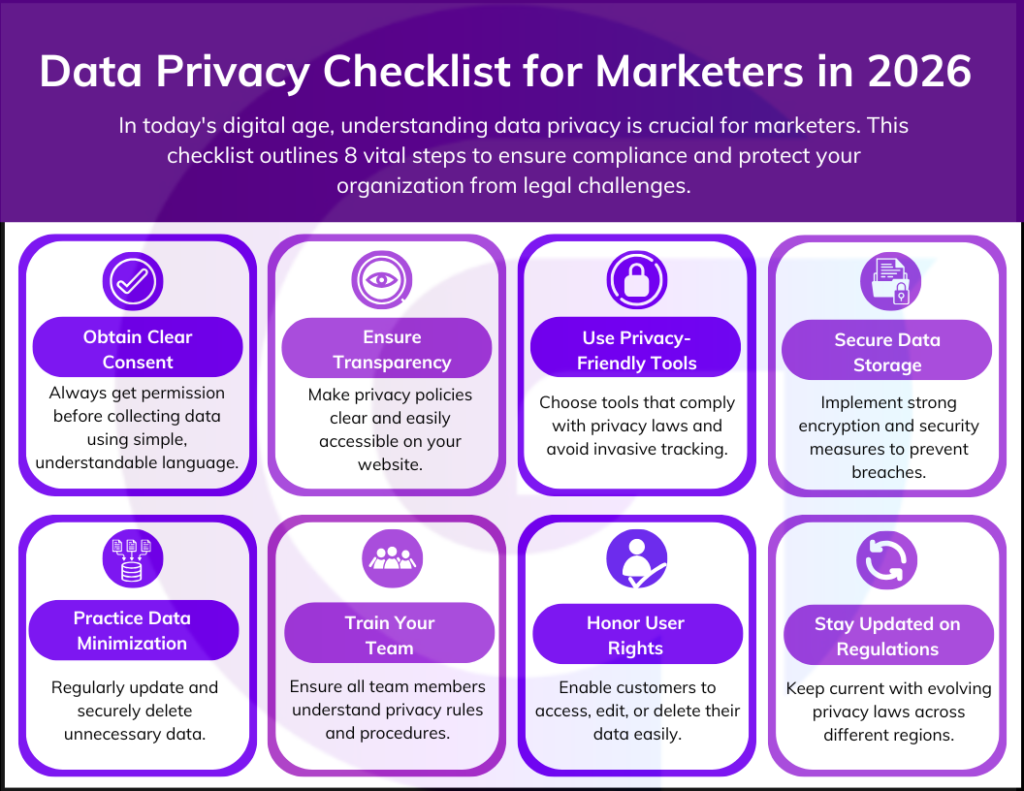
The tracking steps above cover your tags. This checklist covers the wider habits that keep a marketing team out of trouble.
- Get clear consent. Ask before collecting personal data, in plain language, and keep a record of each choice.
- Be transparent. Keep your privacy policy current and easy to find, and describe what you collect, why, and who receives it.
- Use privacy-friendly tools. Choose vendors that support consent signals and have clear data processing terms, and sign a data processing agreement with each one.
- Secure what you store. Use encryption, access controls and multi-factor authentication for any system holding customer data.
- Minimise and delete. Collect only what you need, set retention periods, and delete old data securely.
- Train your team. Everyone who handles customer data, including freelancers and agencies, should know the basic rules.
- Honour user rights. Make it simple for people to access, correct, delete or move their data, and to opt out of sale or sharing.
- Review regularly. Laws, browsers and ad platforms change. Put a quarterly review in the calendar.
If an agency runs your tracking, ask them about it directly. Our guide to choosing a digital marketing agency includes a question on how they handle tracking, consent and data privacy compliance, and a good answer is specific.
What Is Next for Data Privacy in Marketing
Predictions in this area age quickly, so here is what is actually in motion as of this review:
- EU cookie and GDPR reform is still a proposal. The European Commission’s Digital Omnibus package would change some cookie and data rules, but it is still being negotiated and is not law. Current GDPR and ePrivacy rules still apply.
- More US states are legislating. Expect more comprehensive laws and tighter rules on sensitive data, so a single baseline standard saves work.
- Browser-level signals are gaining weight. Honouring Global Privacy Control is already required in California, and several other state laws include similar opt-out signal rules.
- Google is keeping third-party cookies for now. That is not a reason to stop investing in first-party data. Other browsers still block them, and consent rules do not depend on cookies.
Frequently Asked Questions
Is Consent Mode v2 mandatory?
Google does not force it on every site, but if you advertise through Google to people in the EEA or UK, Google’s EU user consent policy expects valid consent signals, including ad_user_data and ad_personalization. Without them, remarketing audiences and conversion measurement for that traffic can be limited.
Do I need a cookie banner if I only use analytics?
It depends on where your visitors are. In the EU, most analytics cookies need consent. The UK now has a narrow exemption for cookies used only for statistics, if you give clear information and a way to object. In most US states you do not need an opt-in banner, but you do need a privacy notice and a way to opt out of sale or sharing.
Does GDPR apply to a company outside Europe?
Yes, if you offer goods or services to people in the EU or monitor their behaviour, for example through tracking cookies. Where your business is based does not change that.
Is server-side tracking a way around consent?
No. Moving tags to a server changes where data is processed, not whether you need permission. If a visitor refuses advertising cookies, you should not forward their data to ad platforms from your server either.
Has Google removed third-party cookies from Chrome?
No. In April 2025 Google decided to keep its current approach to third-party cookie choice in Chrome, and in October 2025 it announced it was retiring most Privacy Sandbox technologies. Safari and Firefox still block third-party cookies by default.
What is the difference between first-party and zero-party data?
First-party data is anything you collect directly from your audience on your own channels, such as purchases and on-site behaviour. Zero-party data is the part people tell you on purpose, such as preferences from a survey or preference centre.
Final Thoughts
Privacy compliance and good marketing measurement are the same project. A clear consent experience, honest first-party data collection and a tracking setup that respects visitor choices give you data you can defend and use. Start with the audit, get the consent signals right, and review the setup every quarter.
This article is general information and not legal advice. For decisions about your specific business, speak to a qualified privacy professional.
Not sure your tracking setup is compliant?
We audit your tags, consent signals and conversion tracking, then fix what is broken so your campaigns keep reporting accurately.
Fix My Tracking Setup
**Shalini Thakur** is an SEO Specialist at Goal Maximize with 9+ years of experience in technical SEO, content strategy, and AI-powered search optimization. Specializes in data-driven SEO strategies, website optimization, content development, and adapting websites to the evolving AI-powered search landscape.