The mobile app development process follows the same 8 stages whether the app is a booking tool or a marketplace. What changes is how long each stage takes and what the agency needs from you. This guide covers each stage for first-time buyers. If you are still deciding whether to build, start with our mobile app development guide.
Timings below are our own planning estimates. Store rules and fees come from Apple and Google’s own pages, read on 10 November 2026.
The 8 stages at a glance
Short answer: building a mobile app takes 8 stages, from validating the idea to releasing and improving the app. A simple app usually takes 2 to 3 months, a medium app 4 to 7 months and a complex app 8 to 12 months or more. Those are our estimates. Last reviewed: 10 November 2026.
- Discovery and validation: confirm the problem, the users and the business case.
- Requirements and scope: write down what the first version does and does not do.
- UX research and wireframes: map the flows and lay out every screen in plain form.
- UI design and prototype: add the brand and build a clickable prototype.
- Development: build the screens, the back end and the APIs.
- QA and beta testing: find bugs on real devices and with real users.
- App store submission: prepare listings and pass Apple and Google review.
- Launch and iteration: release, measure and plan version 2.
1. Discovery and validation
Discovery tests the idea before anyone designs a screen. The team interviews you, studies competitors, talks to likely users and decides which problem version 1 should solve. It also confirms that an app is the right format, because a website or PWA sometimes does the job for less. Our comparison of mobile app vs website vs PWA covers that choice.
Deliverable: a short discovery brief with target users, the core problem, success measures and a recommended platform plan.
2. Requirements and scope
Requirements turn the idea into a written list of what the app does. Features are sorted into must-have, nice-to-have and later. This is where an MVP is defined: the smallest version that tests your idea with real users. The team also lists integrations such as payments and maps, because they drive how much a mobile app costs.
Deliverable: a scope document with user stories, a ranked feature list, a technical outline and a cost and time estimate tied to that scope. After you sign it off, every change goes through a change request.
3. UX research and wireframes
UX work decides how the app is organised before colour or branding enters. Designers map the user flows, such as sign-up, search and checkout, then draw wireframes: plain black-and-white layouts of each screen. Changing a wireframe is far cheaper than changing finished code.
Deliverable: user flows, a map of all screens and clickable wireframes.
4. UI design and prototype
UI design adds the brand: colours, type, icons and every screen state, including empty, loading and error screens. The designers then link the screens into a clickable prototype you can open on your own phone. Designs follow the platform’s conventions for iOS and Android.
Deliverable: a design system, final screens for each platform and a clickable prototype. Developers build exactly what you approve here.
5. Development (front end, back end, APIs)
Development is the longest and most expensive stage. The front end is what users see and tap. The back end is the server, database and business rules. APIs are the connections between the app, the back end and outside services such as payments. Work usually runs in short cycles called sprints, often 2 weeks long. The stack choice, explained in our guide to React Native vs Flutter vs native, is settled before this stage starts.
Deliverable: a working build after every sprint, a test server and API documentation. Our mobile app development team shares each build as it is produced.
6. QA and beta testing
QA starts while development is still running. Testers check each feature against the scope, then try real iPhones and Android phones of different sizes and ages, slow networks, incoming calls and denied permissions, as our app testing and QA service does.
Beta testing then puts the build in front of real users. Apple’s TestFlight allows up to 100 internal testers and up to 10,000 external testers, and a build stays available for 90 days. Apple says the first external build may need a beta review. Google has its own testing rule, covered under stage 7.
Deliverable: a test report, a bug list with priorities and a beta feedback summary.
7. App store submission
Submission is more than uploading a file. You need developer accounts: Apple’s program costs $99 per year and Google charges a $25 one-time fee. You also prepare the listing: name, description, screenshots, a support link, a privacy policy and, for apps with sign-in, a demo login for reviewers.
Apple says App Review typically checks at least 50% of submissions in under 24 hours and 90% in under 48 hours. It also says over 40% of unresolved issues relate to guideline 2.1, App Completeness: crashes, placeholder content and missing information. Still, budget time for a rejection and a resubmission.
Google adds a rule for new personal accounts. For accounts created after 13 November 2023, Google requires a closed test with at least 12 testers opted in for 14 continuous days before production access. Start that clock during QA, or it delays your launch.
Deliverable: approved store listings, submitted builds and replies to any review questions.
8. Launch and iteration
Launch is the start of the product’s life, not the end. The team releases the app, watches crash reports, reviews and analytics, and fixes urgent bugs fast. Plan for 15% to 20% of the build cost each year for upkeep, an agency rule of thumb from our cost guide and not measured data. Real usage then decides what version 2 includes.
Deliverable: the live app, an analytics dashboard and a ranked backlog for the next release.
Typical timeline per stage
These ranges are our own estimates for a medium app. Scope drives them, so treat them as a planning guide, not a promise.
| Stage | Typical range | What stretches it |
|---|---|---|
| 1. Discovery and validation | 1 to 2 weeks | Hard-to-reach users, or an idea that is still changing |
| 2. Requirements and scope | 1 to 2 weeks | Decision-makers who disagree on the must-haves |
| 3. UX research and wireframes | 2 to 3 weeks | Several user types, each with its own flow |
| 4. UI design and prototype | 2 to 4 weeks | Slow feedback rounds and late brand changes |
| 5. Development | 8 to 16 weeks | Integrations, a large back end, extra platforms |
| 6. QA and beta testing | 3 to 5 weeks | Many devices, many bugs, slow tester feedback |
| 7. App store submission | 1 to 2 weeks | A rejection, or the Google closed test |
| 8. Launch and iteration | Ongoing | Ongoing; depends on your roadmap |
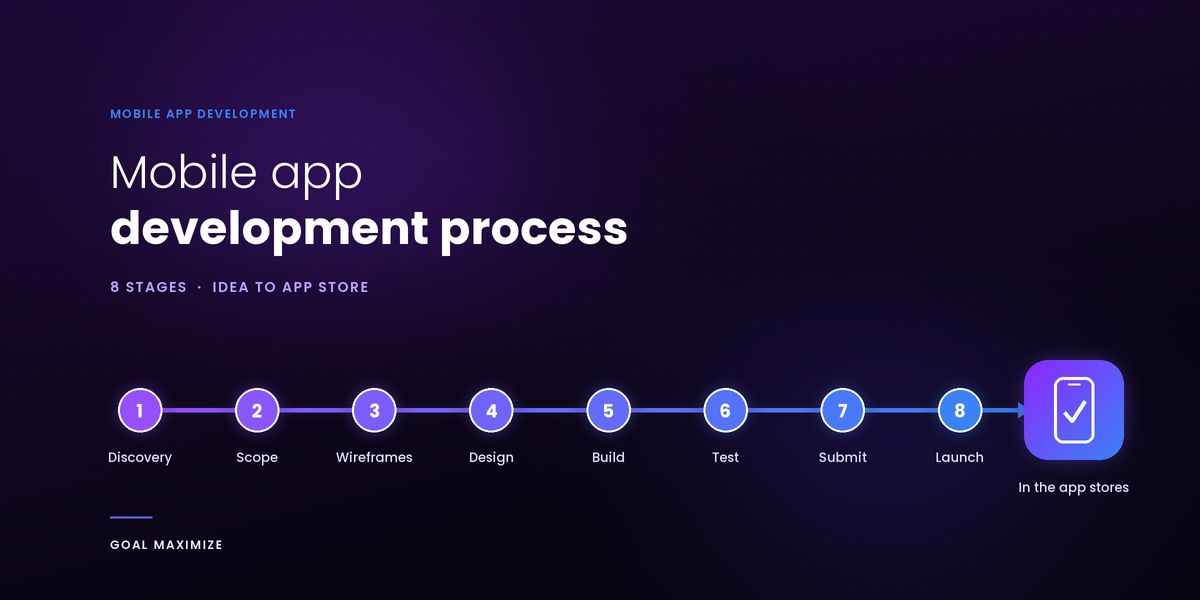
Added end to end, stages 1 to 7 total 18 to 34 weeks. In practice UI design starts before UX finishes and QA starts before development ends, so a medium app reaches launch in about 4 to 7 months, the range in our cost guide. The graphic below shows one such schedule.
What you must provide at each stage
Delays rarely come from the code. They come from missing inputs and late answers. The right-hand column is an approval gate: a good app development partner should not move on until you sign off.
| Stage | You provide | You approve (the gate) |
|---|---|---|
| 1. Discovery | Business goals, target users, competitor list, access to customers for interviews | The discovery brief and platform plan |
| 2. Requirements | Must-have features, existing systems to connect, budget ceiling | The scope document and estimate |
| 3. UX | Feedback on every flow within the agreed time | Wireframes and user flows |
| 4. UI | Logo, brand colours, fonts, photos and copy | Final designs and the prototype |
| 5. Development | Third-party accounts and API keys, content, sprint feedback | Each sprint build and the feature-complete build |
| 6. QA and beta | A beta tester list, decisions on which low-priority bugs may ship | The release candidate |
| 7. Store submission | Developer accounts in your company’s name, privacy policy, support page, demo login | Listing text, screenshots and the release date |
| 8. Launch | A marketing plan, support contact and success measures | The first 30 days of data and the version 2 backlog |
Who does what: a RACI view
R does the work, A has the final say, C is consulted and I is informed. You hold the final say at every gate, so quick feedback from you shortens the schedule.
| Stage | You | Project manager | Designer | Developers | QA |
|---|---|---|---|---|---|
| 1. Discovery | A | R | C | C | I |
| 2. Requirements | A | R | C | C | C |
| 3. UX | A | C | R | C | I |
| 4. UI | A | C | R | C | I |
| 5. Development | A | C | C | R | C |
| 6. QA and beta | A | C | I | R | R |
| 7. Store submission | A | R | C | R | C |
| 8. Launch | A | R | I | R | C |
Common reasons projects slip
In our experience budgets break at 3 points: scope added after sign-off, integrations found late and bug fixing nobody estimated. That is our judgment, not measured data, and our app cost guide shows what each adds. Common causes:
- Scope creep. Every feature added after stage 2 adds design, build and test work, so route each one through a change request.
- Slow feedback. A team waiting 5 days for an answer cannot keep the schedule.
- Too many decision-makers. Name 1 person who can approve a gate.
- Late inputs. Missing logos, copy, API keys and store accounts stop work as surely as a bug does.
- Skipping the prototype. Problems found in development cost more than the same problems found in design.
- Store rejection. Apple’s own figure, over 40% of unresolved issues tied to App Completeness, shows why testing before submission matters.
FAQs
How long does it take to build a mobile app?
A simple app usually takes 2 to 3 months, a medium app 4 to 7 months and a complex app 8 to 12 months or more. Those are our own planning estimates, and scope is the biggest driver. Clutch data quoted in our app cost guide shows a higher average of about 11 months.
What are the stages of app development?
There are 8: discovery and validation, requirements and scope, UX research and wireframes, UI design and prototype, development, QA and beta testing, app store submission, then launch and iteration. Each ends with a deliverable and an approval from you.
What is the difference between an MVP and a full app?
An MVP is the smallest version that solves one core problem for real users, so you learn before spending more. A full app adds secondary features, polish and scale once the MVP has proved demand. It is a scope decision made at stage 2, not a different process: the same 8 stages apply with a shorter feature list.
Do I need a prototype before development?
For most projects, yes. A clickable prototype lets real people test the flow before any code exists, and changing a prototype costs far less than changing finished code. A very small app can get by with wireframes, but we would not skip the prototype for anything with accounts or payments.
Next step: write down your goal, your must-have features and who on your side can approve each gate. Then ask 2 or 3 agencies to show their version of these 8 stages. If you would like ours, see our mobile app development services or contact the team to plan your first stage.

Shalini Thakur is the Marketing Head at Goal Maximize with 10+ years of experience in SEO, content strategy, and AI-powered search optimization. Areas of focus include data-driven marketing strategies, technical SEO, content development, and keeping websites visible as search shifts to AI-generated answers.