Most business owners who search for mobile app development for business are really asking a different question: will an app make us more money than the website we already have? Sometimes it will. Often, not yet.
This business mobile app guide helps you decide first. If the answer is yes, it then walks you through the technology choice, what drives cost, the build process, the brief, testing, App Store Optimization and how the app should feed your lead generation.
We will tell you when not to build an app, because that is the most useful thing a guide like this can do. An app nobody opens is an expensive business card.
Quick answer: Build an app when people will use it often, when it needs phone hardware or offline use, or when it earns repeat revenue a mobile site cannot. If customers deal with you once or twice a year, a fast responsive website wins. If you do build, pick cross-platform unless you have a specific reason for native, write a clear brief first, and budget for upkeep after launch.
In this guide
- Do you actually need a mobile app?
- Native vs cross-platform development
- How much does mobile app development cost?
- The mobile app development process, step by step
- Requirements to define before you hire a developer
- Testing your app before launch
- App Store Optimization (ASO)
- Mobile app strategy: lead generation and conversion
- Custom vs enterprise app development
- FAQ
- Your next step
Do you actually need a mobile app?
An app earns its place when it does a job a website cannot do as well. Everything else is a nice-looking cost.
Start with what your customers do today. Check how much of your traffic already arrives on a phone and what those visitors do. If your mobile site is slow or clumsy, an app will not rescue it, because the same problems simply move into the app.
App vs website: what actually differs
| Mobile website | Mobile app | |
|---|---|---|
| How people find you | Search engines, ads, links, social | Store search, or you send them there |
| Getting started | Tap a link and it opens | Find it, download it, open it |
| Updates | You publish and everyone sees it | Users update, and the stores review releases |
| Phone hardware | Limited access | Full access to camera, GPS, Bluetooth, biometrics |
| Offline use | Limited | Can work fully offline |
| Notifications | Possible but patchy | Strong and reliable |
| Build and upkeep cost | Lower | Higher, and it never stops |
| Reach | Any device with a browser | Per platform, per store |
The biggest difference is not in the table. A website is found by people who have never heard of you. An app is used by people who already chose you. That is why apps are rarely a good first touchpoint and often a good way to keep customers.
Apple also draws a line here. Its App Store Review Guidelines say an app must offer more than a repackaged website, and apps that fail that test can be rejected. So “our website in an app wrapper” is not a plan.
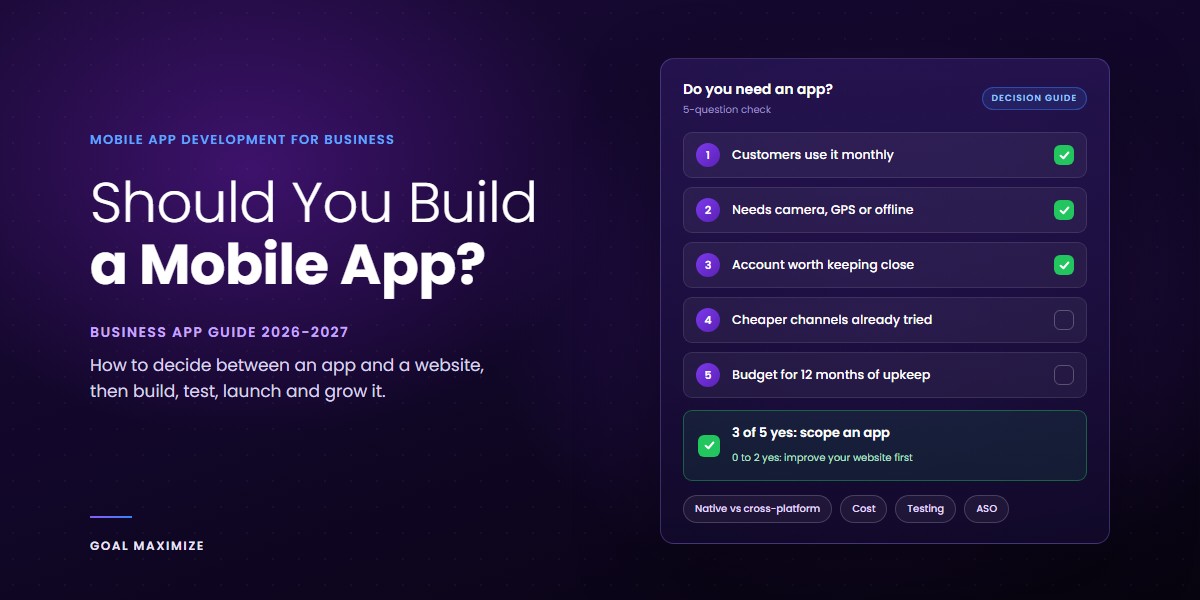
A 5-question decision framework
Answer these honestly, using your real customers and not the ones in your pitch deck.
- Frequency: will a typical customer use it at least once a month?
- Capability: does it need the camera, GPS, Bluetooth, biometrics or offline use?
- Relationship: does the customer have an account, history, bookings or loyalty points worth keeping one tap away?
- Alternatives: have you already exhausted cheaper ways to reach them, such as email, SMS or WhatsApp?
- Commitment: can you fund upkeep and promotion for at least 12 months after launch?
The rule: if you can answer yes to at least 3 of the 5 questions, scope an app. With 0 to 2 yes answers, improve your website first and revisit in 6 months.
The middle path: a responsive site or a PWA
A progressive web app (PWA) is a website that behaves more like an app, with an icon on the home screen and some offline support. It costs far less than a store app and is a sensible stepping stone. One caveat: on iPhone, web push notifications reach web apps that the user has added to the Home Screen, a change that arrived with iOS and iPadOS 16.4.
Our recommendation: if you are unsure, build the web experience first. Our website design guide covers how to get that right, starting with a mobile-first approach, because many of your visitors will already be on a phone. Run it for 6 months. If customers start asking for things only an app can do, such as offline access or reliable notifications, you have your evidence.
Native vs cross-platform development
For most business apps, cross-platform is the right default. Choose native when the app depends on the newest platform features, heavy graphics or deep hardware work.
Native means 2 separate apps: 1 in Swift for iPhone, 1 in Kotlin for Android. Cross-platform means 1 codebase that runs on both. The main tools are Flutter from Google, React Native from Meta, and Kotlin Multiplatform from JetBrains, which shares business logic while keeping the screens native.
| Native (Swift, Kotlin) | Cross-platform (Flutter, React Native, KMP) | |
|---|---|---|
| Codebase | 2 separate apps | Mostly 1 shared codebase |
| Team | 2 skill sets | 1 team can cover both |
| New OS features | Available from day 1 | May wait for framework or plugin support |
| Demanding graphics or sensors | Best option | Good for most, risky for the extreme cases |
| Cost and time to first launch | Higher | Usually lower |
| Long-term upkeep | 2 apps to maintain | 1 app plus framework and plugin updates |
The hidden cost nobody mentions
Cross-platform saves money on the build, but it adds a dependency. When Apple or Google ship a major OS release, you wait for the framework and every plugin you rely on to catch up.
Native has its own cost: every feature gets built and tested twice. Neither choice is free. Ask your developer to explain the trade-off for your specific features, not in general.
How to choose
Pick native if the app is built around camera processing, augmented reality, Bluetooth devices, or smooth heavy animation. Pick cross-platform if it is mostly forms, lists, bookings, payments, accounts and content.
Also check who your customers are. Look at your own analytics for the iPhone and Android split, because it varies widely by market and audience. If one platform dominates, launch there first and add the other later.
Whichever route you take, ask your developer to name the 3 libraries or plugins the app depends on most, and how often each one is updated. An abandoned dependency can leave a working app unable to ship updates.
How much does mobile app development cost?
Cost depends mainly on scope, platforms, integrations and who builds it. We are not printing a price table here, because any number we gave you would be wrong for your project.
Any quote you receive before someone has seen your scope is a guess. Treat a precise figure from a 1-paragraph description as a warning sign, not a bargain.
What drives the price
Scope and features. A 5-screen app with a login is a different project from a marketplace with payments, chat and an admin panel. Every feature has a design, build, test and maintenance cost, and the combinations multiply.
Platforms and stack. 2 native apps cost more than 1 cross-platform app in most cases. Adding a tablet layout, a smartwatch companion or a web version adds more.
Design. A standard interface built from common components is cheaper than a custom design system with bespoke animation. Do not pay for polish before you have proven that people want the app.
Backend and integrations. This is the part owners forget. Most apps need a server, a database, an admin dashboard and connections to your CRM, payment gateway, inventory or ERP. The screen you see is often the smaller part of the work.
Security and compliance. Handling payments, health data or personal data raises the bar. In India, that includes meeting the obligations of the Digital Personal Data Protection Act, 2023 for the personal data you collect.
Team model. A freelancer, an agency and an in-house team price differently, and carry different risks. The cheapest option on day 1 is often the most expensive by month 12 if no one can maintain the code.
The costs after launch
Budget for what happens after the app is live: developer accounts, hosting, third-party services that bill by usage (maps, SMS, push, analytics), bug fixes, and updates for each new iOS and Android release. Upkeep never reaches zero, so plan for it from day 1.
Our recommendation: ask for a paid discovery phase first, then a quote broken into milestones. That way you buy a clear plan before you commit to the full build. Compare quotes line by line: if 1 vendor leaves out testing, backend work or post-launch support, the lower price is not really lower.
The mobile app development process, step by step
A well-run project moves through 8 steps. Skipping the first 2 is the most common reason apps go over budget.
Steps 1 and 2: validate the idea and define scope
Step 1: validate. Talk to 5 to 10 real customers before anyone writes code. Ask how they handle the problem today and what they would stop doing if your app existed.
Step 2: define the first version. Decide the smallest app that proves the idea. Write down what is in, what is out and what success looks like. The next section covers this brief in detail.
Steps 3 and 4: prototype and design
Step 3: wireframes and a clickable prototype. Test the prototype with 5 users before you build. It is the cheapest place in the project to change your mind.
Step 4: UI and UX design. Good app design is about the few things users do most, made fast and obvious. Design the main task for 1 hand on a small screen first, then scale up.
Steps 5 and 6: build and test
Step 5: build the frontend, backend and integrations. Insist on working builds you can install every 2 weeks or so. If you only see progress in slide decks, the risk is growing in the dark.
Step 6: test continuously, not at the end. The testing section below covers what to check.
Steps 7 and 8: launch and iterate
Step 7: submit to the stores. Both Apple and Google review apps against their policies, and requirements change often. Check the official pages, such as Apple’s upcoming requirements and Google Play’s target API level policy, before you plan your launch date.
Step 8: learn and improve. Launch is the start of the data, not the end of the project. Release small updates, read the reviews and cut features nobody uses.
If you would rather have one team run all 8 steps, our mobile app development services cover design, build, testing and launch.
Requirements to define before you hire a developer
A developer can only build what you can describe. Vague briefs produce vague quotes, and vague quotes produce change requests.
Before you speak to anyone, write down these 7 things:
- The business goal and 1 number that proves it worked, such as bookings, repeat orders or support calls avoided.
- Your users and the 3 tasks they must be able to finish in the first minute.
- Features, ranked as must have, should have and could have. Only the first group goes into version 1.
- Platforms and devices you need to support, based on your customer data.
- Integrations with systems you already use, such as CRM, payments, inventory or accounting.
- Data and compliance: what personal data you collect, why, and how consent and deletion will work.
- Budget and deadline, including what is fixed and what can move.
Own your accounts and your code
Register the Apple Developer Program and Google Play Console accounts in your company’s name, not your agency’s or a freelancer’s. Apple asks organizations for a D-U-N-S Number when enrolling, so start that early.
Put code ownership in the contract, and ask for the source code and design files at each milestone. If a relationship ends badly, this is the clause you will be glad you wrote.
Apple also requires apps that let people create an account to let them delete it inside the app, and it expects you to avoid forcing a login when the app does not need one. Both rules sit in section 5.1.1 of the guidelines linked above, and are cheaper to plan for now than to retrofit. Your data privacy basics apply to the app just as they do to your website.
Choosing who builds it
Ask for 2 or 3 relevant apps already in the stores, a named project lead, and a clear answer on who supports the app after launch. Also ask how they handle bugs found after launch, and what happens if you later want to move to another team.
Our recommendation: do not ask for quotes until this list is on paper. Then expand it into a short brief a team can build from and quote against.
Testing your app before launch
Test on real phones, on slow networks, with real accounts. An app that works on the developer’s new phone and office Wi-Fi proves almost nothing.
What to test
Functional testing checks that every feature does what the brief says. Device and OS testing covers a spread of screen sizes, OS versions and manufacturers, picked from your customer data.
Performance testing looks at launch time, scrolling and battery use, on older phones too. The same lesson applies as on the web: speed affects sales, and users abandon slow screens.
Security testing covers login, stored data, and what travels over the network. Usability testing puts the app in front of 5 people who have never seen it, and you watch silently.
Do not forget the messy cases: a phone call mid-checkout, a lost connection, a full storage disk, a denied permission, an app update over old data. These cause many of the crashes your users will actually meet.
Use the stores’ own testing tools
Apple’s TestFlight lets you invite outside testers before a public release, and Google Play offers its own testing tracks inside the Play Console. Use them with real customers, not just your team.
Know the numbers Google watches
After launch, quality becomes a ranking issue. Google Play treats a user-perceived crash rate of 1.09% of daily active users, or a user-perceived ANR (app not responding) rate of 0.47%, as bad behavior, and an app that exceeds it may be less discoverable. The thresholds are published on the Android vitals page in Play Console Help, and Google may update them.
Our recommendation: set a go-live bar before testing begins, such as 0 open critical bugs and a clean run through your top 3 user journeys. Retest the same journeys after every major OS release, not just before launch.
App Store Optimization (ASO)
ASO is SEO for app stores. Its job is to make your listing easy to find and easy to say yes to.
One honest caveat first: if your app is for existing customers, most installs will come from your website, email and in-store prompts, not store search. ASO matters most when people search for what you do, without knowing your name.
What moves your listing
Title, subtitle and keywords. Use the words customers actually type. Both stores cap the length of the app name, subtitle or short description, and keyword fields, so choose each term with care and check the current limits in each store’s console before you write copy.
Icon and screenshots. These do most of the persuading. Show the main benefit in the first 2 screenshots, with short captions a skimming reader can follow.
Ratings and reviews. Ask for a rating after a good moment, such as a completed order, never on the first launch. Reply to negative reviews politely and fix what they point out.
Testing your listing. Both stores let you test variants. Apple offers product page tools in App Store Connect, and Google Play has store listing experiments. Change 1 element at a time.
Bring your own traffic
The strongest ASO move is to send people to the listing yourself. Put store links on your website, in your email signature and on receipts, and use a QR code on packaging or in your shop.
Our recommendation: spend your first ASO hour on the app name and the first 2 screenshots, since they shape both ranking and conversion. The keyword research habits you use for web carry over, so keyword research for beginners is a good primer.
Mobile app strategy: lead generation and conversion
A mobile app strategy answers 1 question: what business result does this app produce, and how will we know? If the answer is “brand presence”, stop and rethink.
Apps rarely win cold leads, because a stranger will not download an app for a company they have never used. They are strong at the next stages: turning an interested person into a customer, and a customer into a repeat one. Think of the app as the middle and bottom of your funnel.
4 jobs an app can do for your pipeline
Capture intent at the moment it appears. Quote requests, bookings and callbacks built into the app are faster than a web form on a small screen. Keep forms short and ask only for what your team needs to reply, just as you would on a landing page.
Give a reason to install. A real tool, such as a calculator, tracker, estimator or booking manager, works like a lead magnet that people actually use. An app that only repeats your brochure does not.
Bring people back. Push notifications and in-app messages drive repeat visits when they are useful and rare. Send them for order updates and relevant offers, not daily nudges, or users will switch them off or delete the app. Pair them with email, so customers who skip notifications still hear from you.
Connect it to your ads and website. Link ads, emails and web pages straight to the right screen inside the app, so users do not land on a generic home screen. People who visited your site but did not install can also be reached with retargeting.
Measure the app like any other channel
Track installs, but do not stop there. The numbers that matter are activation (how many finish the first key task), repeat use, leads or orders from the app, and cost per acquired customer. Pick the 2 or 3 that match your goal and ignore vanity numbers such as total downloads.
Treat the app as one part of a bigger system. The lead generation playbook shows how channels fit together, and the same testing discipline applies inside the app: change 1 thing at a time and keep what wins.
Our recommendation: pick 1 primary business metric for the app, write it in the brief, and review it monthly. If it is not moving after 2 or 3 updates, change the app or stop investing.
Custom vs enterprise app development
Custom app development means building an app around your specific processes and customers, instead of adapting an off-the-shelf product. Enterprise app development is the same craft applied to large organizations, where the users are employees, partners or a big customer base, and the app must fit existing systems and rules.
What stays the same
The decision framework, the brief, the testing and the post-launch loop apply to both. An enterprise app that nobody wants to use fails just as quietly as a consumer one.
Where enterprise differs
Identity and access. Enterprise apps usually need single sign-on with the company’s identity provider, role-based permissions and audit logs.
Integration depth. The app has to talk to ERP, HR, CRM and legacy systems, often through an API layer that must be built or cleaned up first. This is where timelines grow.
Distribution. Internal apps often skip the public stores. Apple and Google both provide ways to distribute privately to managed company devices, so ask your developer how the app will be deployed and updated.
Security, compliance and procurement. Expect security reviews, data residency questions, accessibility requirements and longer approval cycles. Build those into the plan, not onto the end.
Offline and field use. Many enterprise apps are used in warehouses, on sites or in vehicles with poor signals, so they must sync reliably when the connection returns.
Support. A named owner, defined response times and a plan for OS updates matter more here, because thousands of employees may depend on the app on a Monday morning.
Our recommendation: if you are a growing business, start with a lean custom app and design the backend so enterprise features such as roles, single sign-on and audit trails can be added later.
FAQ: mobile app development for business
Do I need a mobile app for my small business?
Not always. If customers use your service once or twice a year, a fast, mobile-friendly website is usually the better investment. An app makes sense when people will use it often, need phone features like the camera or offline access, or return regularly to book, reorder or track something.
Should I build for iPhone or Android first?
Build first for the platform most of your customers use. Check your own website and customer data for the split, because it varies by market and audience. If you are unsure, a cross-platform build lets you launch on both without paying for 2 separate apps.
How long does it take to build a mobile app?
A narrow first version can take weeks to a few months, and complex apps with many user roles and integrations take much longer. Scope, integrations, design approvals and store review all affect the timeline. Be wary of any firm date given before your scope has been reviewed.
How much does it cost to develop a mobile app?
It depends mainly on scope, platforms, design, backend work and integrations, plus who builds it. Ongoing costs after launch, such as hosting, updates and support, are part of the real budget. A fair quote comes after a discovery phase, not before.
Is a progressive web app (PWA) enough instead of a native app?
Often yes, if you mainly need access, content, forms and basic offline use. A PWA is cheaper and easier to update. Choose a store app if you need deeper hardware access, reliable push notifications on every device, or a presence in the app stores.
Who owns the app code and the store accounts?
You should. Register the Apple and Google developer accounts under your company name and write source code ownership into the contract. Ask for the code and design files at each milestone so you are never locked in to one vendor.
Your next step
Run the 5-question test from the first section on your own business. If you get 3 or more yes answers, write a 1-page brief using the list above and talk to a developer about a short discovery phase.
If you get fewer, put your effort into a faster, better mobile website first. That is a perfectly good answer, and it costs less.
Either way, we are happy to give you a straight opinion. Our team offers custom app development for businesses at every stage, and you can book a free app consultation to talk through your idea before you spend anything.

**Shalini Thakur** is an SEO Specialist at Goal Maximize with 9+ years of experience in technical SEO, content strategy, and AI-powered search optimization. Specializes in data-driven SEO strategies, website optimization, content development, and adapting websites to the evolving AI-powered search landscape.