

Your customers are typing questions into Google every day. Some of them are looking for exactly what you sell. The trouble is that they rarely use the words you use. You say “commercial waterproofing solutions.” They type “roof leaking after rain what to do.”
Keyword research for beginners comes down to closing that gap. You find the words real people use, work out what they want when they use them, and give each one a page that answers it. You don’t need paid tools to start. Everything in this guide works with free tools, and most of it takes an afternoon.
By the end you’ll have a short list of keywords worth chasing and a keyword map that tells you which page targets each one. There’s a free template to download further down.
What Keyword Research Is (and What It Isn’t)
Keyword research is the process of finding the search terms your potential customers use, then deciding which of those terms your website should try to rank for. A keyword can be one word (“plumber”), but it’s usually a phrase (“emergency plumber open sunday near me”).
Google says it plainly in its SEO Starter Guide: think about the words a user might search for. It also points out that people who know a topic well search differently from people who are new to it. That’s the whole point of keyword research. You stop guessing which words people use and start checking.
A few things keyword research is not:
- It isn’t keyword stuffing. Repeating a phrase 20 times won’t help you rank. Google’s language systems understand synonyms and related phrases, so write naturally. Our guide to on-page SEO that matches intent covers how to use keywords on the page.
- It isn’t about the biggest numbers. A keyword with 50 searches a month from ready-to-buy customers can be worth more than one with 50,000 from casual browsers.
- It isn’t a one-time job. Search habits change. A quarterly check keeps your list current.
Step 1: Start With Seed Keywords
Seed keywords are the short, obvious terms that describe your business. They’re where every other keyword grows from. For a bakery, seeds might be “birthday cake,” “custom cake,” and “eggless cake.” For an accounting firm, “bookkeeping,” “GST filing,” and “tax accountant.”
To build your seed list, spend 15 minutes on these questions:
- What do you sell? List every product and service in plain words, not your internal names for them.
- What problems do you solve? Customers often search for the problem (“website not showing on Google”) before they search for the solution (“SEO agency”).
- What do customers say on calls and in emails? Your sales inbox is a goldmine. Copy the exact phrases people use when they first contact you.
- Who are your competitors? Look at the words in their page titles and service menus.
Aim for 10 to 20 seeds. Don’t filter yet. You’ll grow each seed into dozens of longer phrases in the next step.
Step 2: Expand Your List With Free Keyword Research Tools
Paid tools like Semrush and Ahrefs are useful, but you don’t need them to start. These 5 free tools will give you more keyword ideas than you can use.
Google Search Console: the keywords you already rank for
If your site is already live, start here. Search Console shows the actual searches that brought up your pages in Google, which no other tool can tell you for sure. Here’s how to find them:
- Open Google Search Console and choose your property.
- Click Performance, then Search results in the left menu.
- Turn on all 4 metric boxes at the top: Total clicks, Total impressions, Average CTR and Average position.
- Set the date range to the last 3 months, and stay on the Queries tab below the chart.
- Sort by Impressions. Look for queries with plenty of impressions and an average position between 8 and 20.
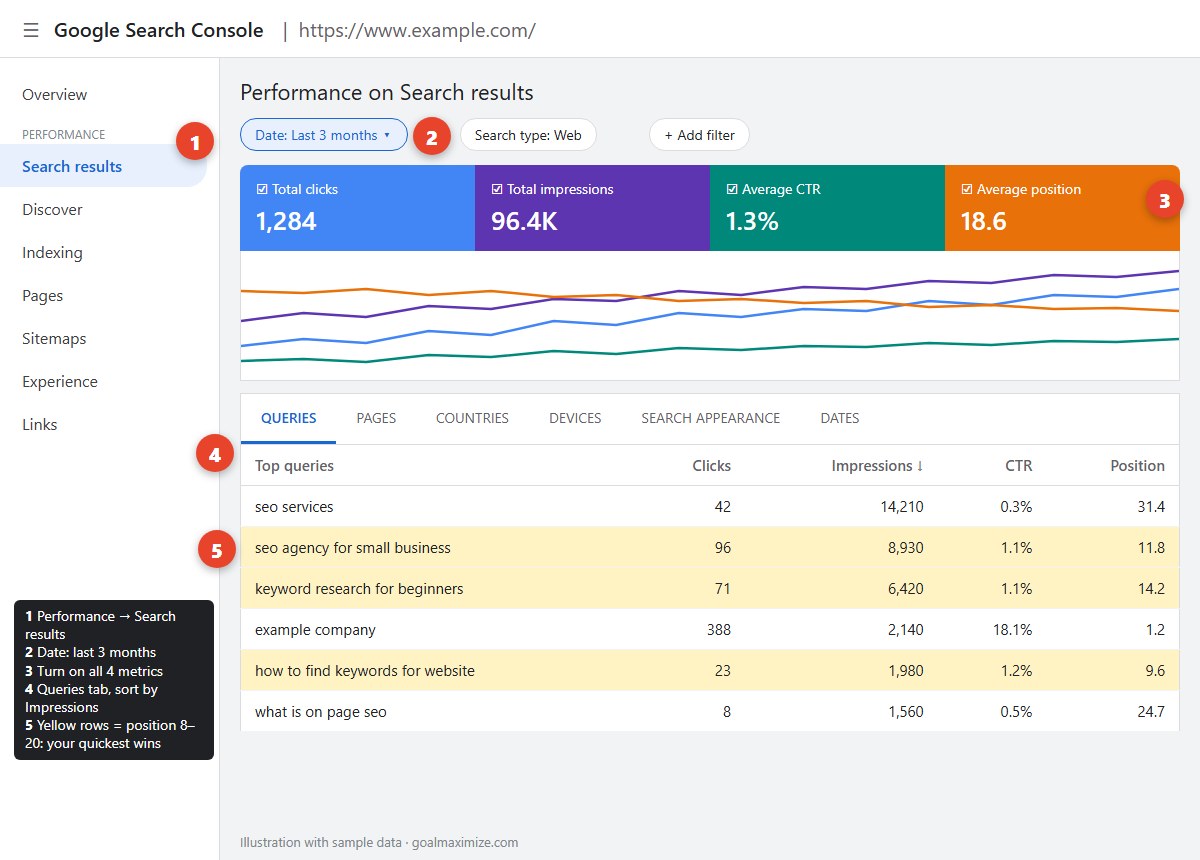
Those position 8 to 20 queries are your quickest wins. Google already thinks your page is relevant, but it sits at the bottom of page 1 or on page 2, where few people click. A better title, a new section or a few internal links can often move it up. To see which page ranks for a query, click the query, then switch to the Pages tab.
Google Keyword Planner: search volume estimates
Google Keyword Planner sits inside Google Ads. It’s built for advertisers, but it’s free to use and you don’t have to run an ad. You do need a Google Ads account with setup and billing details completed.
Choose Discover new keywords, type in 2 or 3 of your seeds, and set your target country. You’ll get a list of related keywords with monthly search estimates and a competition level. One catch: accounts that don’t spend on ads usually see broad ranges such as “1K to 10K” rather than exact numbers. That’s fine for beginners. You only need to know whether a keyword gets 50 searches or 5,000, not the precise figure.
Keep in mind that the “competition” column is about advertisers bidding on the keyword. It doesn’t tell you how hard the keyword is to rank for organically.
Google autocomplete: what people type next
Type a seed into Google and stop before you press Enter. The suggestions that drop down come from real searches. Then try the “alphabet trick”: type your seed followed by a, then b, then c, and so on. “Keyword research a” gives you “keyword research ahrefs,” “keyword research ai,” and more.
Also try putting words in front: “how to,” “best,” “cheap,” “near me,” “vs.” Use an incognito window so your own search history doesn’t skew the results.
People Also Ask: the questions behind a search
Many Google results pages include a People also ask box with related questions. Click one, and more questions load underneath. A few clicks can give you 20 or 30 real questions on your topic.
These questions are perfect for FAQ sections and subheadings. If 5 of them keep coming up, your page should answer all 5.
AnswerThePublic: questions grouped for you
AnswerThePublic pulls autocomplete data and sorts it into questions (who, what, why, how), prepositions (for, with, near) and comparisons (vs, or, and). The free plan gives you a small number of searches per day, which is plenty if you only run your best seeds.
Paste everything you collect from these 5 tools into one spreadsheet. Don’t judge anything yet. In the next steps you’ll sort it.
Step 3: Work Out the Search Intent
Search intent is the reason behind a search: what the person actually wants to get done. It matters more than any other factor in this guide. If your page doesn’t match the intent, it won’t rank, however well it’s written.
Google’s own Search Quality Rater Guidelines sort searches by what users want: to know something, to do something, to reach a specific website, or to visit a place in person. Most SEOs use 4 simpler labels:
| Intent type | What the searcher wants | Example search | Best page type |
|---|---|---|---|
| Informational | To learn or understand something | what is keyword research | Blog post, guide |
| Commercial | To compare options before buying | best SEO agency for small business | Comparison, review, case study |
| Transactional | To buy, book or sign up now | hire SEO consultant | Service page, product page |
| Navigational | To reach a specific brand or site | goal maximize contact | Home page, contact page |
The quickest way to check intent is to search the keyword yourself. Look at the top 10 results. If they’re all blog posts, Google has decided people want to learn, so a sales page won’t rank. If they’re all service pages with prices, a blog post will struggle. Copy whatever format Google is already rewarding, then make yours better.
Intent also tells you where a keyword sits in the buying journey. Informational keywords bring in people early, while transactional keywords bring in people ready to act. Our post on the SEO content funnel shows how to plan content for each stage, from first search to signed contract.
Step 4: Judge Difficulty vs Opportunity
Every keyword is a trade-off between how hard it is to rank for and how much it’s worth if you do. Beginners usually make one of 2 mistakes. They chase huge keywords they’ll never rank for, or they chase easy keywords nobody searches.
Paid tools give each keyword a “difficulty score,” but you can judge it well enough by hand. Search the keyword and look at page 1:
- Hard: page 1 is all big brands, national publishers and Wikipedia, and every result is long and detailed.
- Possible: page 1 mixes big sites with smaller businesses, forum threads (Reddit, Quora) or thin, outdated pages.
- Easy win: the results don’t quite answer the question, or the top pages are old and short.
Then weigh the opportunity. Ask 3 questions about each keyword:
- Relevance: would someone searching this be a good fit as a customer? (Score 1 to 3)
- Intent: how close to buying are they? (Score 1 to 3)
- Volume: are there enough searches to be worth a page? (Score 1 to 3)
Add up the 3 scores, then subtract 1 for “possible” difficulty or 2 for “hard.” Work through your list from the highest score down. Our keyword mapping template has a column for this score.
Step 5: Go After Long-Tail Keywords First
Long-tail keywords are longer, more specific phrases with fewer searches. “Shampoo” is a short-tail keyword. “Herbal shampoo for dry scalp” is long-tail. Each long-tail keyword gets fewer searches, but together they add up to a large share of all searches. They’re also where small businesses can win.
Why start with long-tail?
- Less competition. Big brands rarely write a page for “SEO for dental clinics in Pune.” You can.
- Clearer intent. Someone searching “how much does a website redesign cost for a restaurant” has told you exactly what they need.
- They build toward bigger terms. Rank for 20 related long-tail phrases and Google starts to see you as an authority on the broader topic.
A good rule for a new site: if a keyword is fewer than 3 words and you’re up against national brands, park it for later. Go after the 4 to 7 word versions first.
Step 6: Map Keywords to Pages
This is the step most beginners skip, and it’s the one that ties everything together. A keyword map is a simple table that assigns each keyword to one page on your site. It stops 2 of your own pages from competing for the same search, and it shows you which pages you still need to create.
The rules are simple:
- 1 primary keyword per page. Each page gets one main target, plus a few close variations and related questions as secondary keywords.
- Group keywords with the same intent. “Keyword research for beginners” and “how to do keyword research” want the same answer, so they belong on one page. “Keyword research tools” might need its own.
- Existing page first. If a page already ranks for the keyword in Search Console, improve that page rather than writing a new one.
- Mark the gaps. Keywords with no matching page go on your content plan.
| Keyword | Role | Intent | Difficulty | Score | Target page | Status |
|---|---|---|---|---|---|---|
| keyword research for beginners | Primary | Informational | Possible | 7 | /blog/seo/keyword-research… | Improve |
| how to do keyword research | Secondary | Informational | Hard | 6 | /blog/seo/keyword-research… | Improve |
| seo agency for small business | Primary | Commercial | Possible | 7 | /services/…/seo/ | Improve |
| hire seo consultant | Secondary | Transactional | Possible | 7 | /services/…/seo/ | Improve |
| free keyword research tools | Primary | Commercial | Hard | 5 | None yet | To create |
Free download: keyword mapping template. The same columns as the table above, with a priority score column and example rows. It opens in Excel, Google Sheets or Numbers. Download the keyword mapping template (CSV) ↓
Once each page has its primary keyword, use it in the page title, the H1, the URL and the first paragraph, and use the secondary keywords in subheadings. The 10 steps to rank higher on Google take you through what to do next on each page.
Step 7: Research Prompts for AI Search
More of your customers now ask ChatGPT, Perplexity, Gemini or Google’s AI Overviews before they click a website. They don’t type “SEO agency Delhi.” They type a full question, often with context: “I run a 10-person furniture business and my website gets no traffic. Should I hire an SEO agency or do it myself?”
There’s no Keyword Planner for AI prompts yet, so prompt research is more manual. Here’s a simple way to start:
- Turn your top keywords into full questions. Add who’s asking and why. “Keyword research tools” becomes “What free keyword research tools should a small business owner use?”
- Borrow real questions. People Also Ask, Reddit threads, Quora and your own sales calls are full of the conversational phrasing people use with AI assistants.
- Test the prompts yourself. Ask 5 to 10 of them in ChatGPT, Perplexity and Google’s AI Mode. Note which websites get cited and what the answers have in common.
- Write pages AI can quote. Answer the question directly in the first 2 sentences under a clear heading, then give the detail. Short, factual, well-structured answers are easier for AI tools to pull from.
The good news: pages that rank well in Google and answer questions clearly tend to do well in AI answers too. Prompt research doesn’t replace keyword research. It adds a layer on top.
Step 8: Find Social Search Keywords
Google isn’t the only search bar your customers use. Lots of people, especially under-30s, search YouTube, Instagram, TikTok and Pinterest for recipes, product reviews, tutorials and local spots. These platforms have their own keyword habits.
- Use each platform’s autocomplete. Type your seed into the YouTube, TikTok or Pinterest search bar and note the suggestions. They often differ from Google’s. YouTube searches lean toward “how to” and “review,” while TikTok and Instagram lean toward “ideas,” “hacks” and “aesthetic.”
- Check the “Others searched for” prompts. TikTok and Instagram suggest related searches on results pages and under videos. These are free keyword ideas.
- Put keywords where the platform reads them. Use your keyword in the video title, the caption, the on-screen text and the first few seconds of what you say. Social platforms read and transcribe all of these.
- Treat hashtags as labels, not keywords. 3 to 5 relevant hashtags help, but a clear caption with the search phrase does more.
Add a “Platform” column to your keyword map so you can see which keywords need a blog post, which need a video, and which need both.
Common Keyword Research Mistakes Beginners Make
- Targeting the same keyword on several pages. Your pages end up competing with each other. The keyword map fixes this.
- Ignoring intent. Writing a sales page for a “how to” keyword, or a blog post for a “hire” keyword.
- Trusting volume blindly. Search volume figures are estimates. Use them to compare keywords, not as promises of traffic.
- Using jargon. Your customers say “website not on Google,” not “indexation issues.”
- Doing it once. Recheck Search Console every quarter for new queries and for pages that are slipping.
Keyword research is one part of a bigger SEO system. For how it fits with technical SEO, content and links, read our SEO growth playbook.
Your Next 30 Minutes
Don’t try to do everything at once. Here’s what to do right now:
- Minutes 0 to 5: download the keyword mapping template and list 10 seed keywords.
- Minutes 5 to 15: open Search Console, go to Performance, and copy every query with an average position between 8 and 20 into the template.
- Minutes 15 to 25: run your top 3 seeds through Google autocomplete and People Also Ask. Add the best 15 phrases.
- Minutes 25 to 30: search your top 5 keywords, note the intent from page 1, and assign each to a page on your site.
You’ll finish with a short, prioritised list and a clear idea of which pages to improve first. Do this once a quarter and you’ll always know what your customers are searching for.
Rather have the keyword research done for you?
Our SEO team builds full keyword maps for businesses: competitor gaps, intent analysis, AI and social search terms, and a page-by-page plan you can act on. Get your keyword research done →
Keyword Research FAQ
How do I do keyword research for free?
Start with Google Search Console to see the searches that already show your site. Then expand your list with Google Keyword Planner, Google autocomplete, People Also Ask and the free plan of AnswerThePublic. Together these cover most of what a beginner needs.
How many keywords should I target per page?
Give each page 1 primary keyword and 3 to 5 secondary keywords that share the same intent, such as close variations and related questions. Don’t target the same primary keyword on 2 different pages.
What is a good search volume for a keyword?
It depends on your business. A local service or B2B company can do well with keywords that get 20 to 200 searches a month if the searchers are ready to buy. Relevance and intent matter more than volume.
What are the 4 types of search intent?
Informational (the searcher wants to learn), commercial (they’re comparing options), transactional (they’re ready to buy or book) and navigational (they want a specific website). Search the keyword and look at the top results to see which one Google thinks it is.
Is keyword research still important with AI search?
Yes. AI tools still need web pages to draw answers from, and they tend to use pages that answer specific questions clearly. Add prompt research on top: turn your keywords into the full questions people ask AI assistants, and answer them directly on your pages.
How often should I redo keyword research?
Review your keyword map every 3 months. Check Search Console for new queries, pages that have dropped, and keywords that now need their own page.

**Shalini Thakur** is an SEO Specialist at Goal Maximize with 9+ years of experience in technical SEO, content strategy, and AI-powered search optimization. Specializes in data-driven SEO strategies, website optimization, content development, and adapting websites to the evolving AI-powered search landscape.