
Somewhere around lead 200, the follow-up spreadsheet stops working. You open it on a Tuesday, find 47 people who downloaded something 3 weeks ago, and realise nobody has contacted them since the thank-you email. By lead 1,000 it is no longer a spreadsheet problem. It is a system problem.
Marketing automation lead nurturing is the fix, but most teams build it badly. They write 1 sequence, send it to everyone, and then wonder why the replies read like unsubscribe requests. That is all “robotic” really means: the same message, at the same time, to people in completely different situations.
This guide shows how to build lead nurturing workflows that react to what each person does. You get 6 steps, a lead scoring example, sample B2B and B2C drip sequences, and a comparison of how HubSpot, ActiveCampaign and Mailchimp handle the work. It sits inside our lead generation playbook, which covers the wider channel mix.
Why 1,000 Leads Break Manual Follow-Up
Speed is the first thing to go. A Harvard Business Review study of online sales leads concluded that most companies are not responding nearly fast enough. With 5 leads a week you can fix that by hand. With 1,000, automated lead follow-up is the only way everyone hears back while they still remember you.
Email is also the right place to put that effort. In our breakdown of email marketing ROI in 2026, email came out ahead of the paid channels we compared it with, which is why it carries most of the nurture work below.
If you have not mapped how a stranger becomes a customer, start with our automated sales funnel blueprint. This post covers the middle of that funnel, between “got the email address” and “ready to talk.”
Step 1: Get Consent and Deliverability Right First
A perfect sequence that lands in spam is an expensive diary. Before you write a single email, check 4 things:
- Authentication. Google requires SPF or DKIM for everyone sending to personal Gmail accounts. Senders above 5,000 messages a day also need SPF, DKIM and DMARC, plus one-click unsubscribe. At 1,000 leads you are probably below that line, but set up all 3 anyway. See Google’s email sender guidelines.
- Spam complaints. Google asks senders to keep their spam rate below 0.3% in Postmaster Tools.
- A working unsubscribe. The FTC’s CAN-SPAM guide says the law makes no exception for business-to-business email. You must honor opt-outs within 10 business days and include a valid physical postal address.
- A consent record. Store where and when each person signed up. If a lead came from a form, tag it with the exact offer, because Step 2 depends on it.
Step 2: Segment by What People Did, Not Who They Are
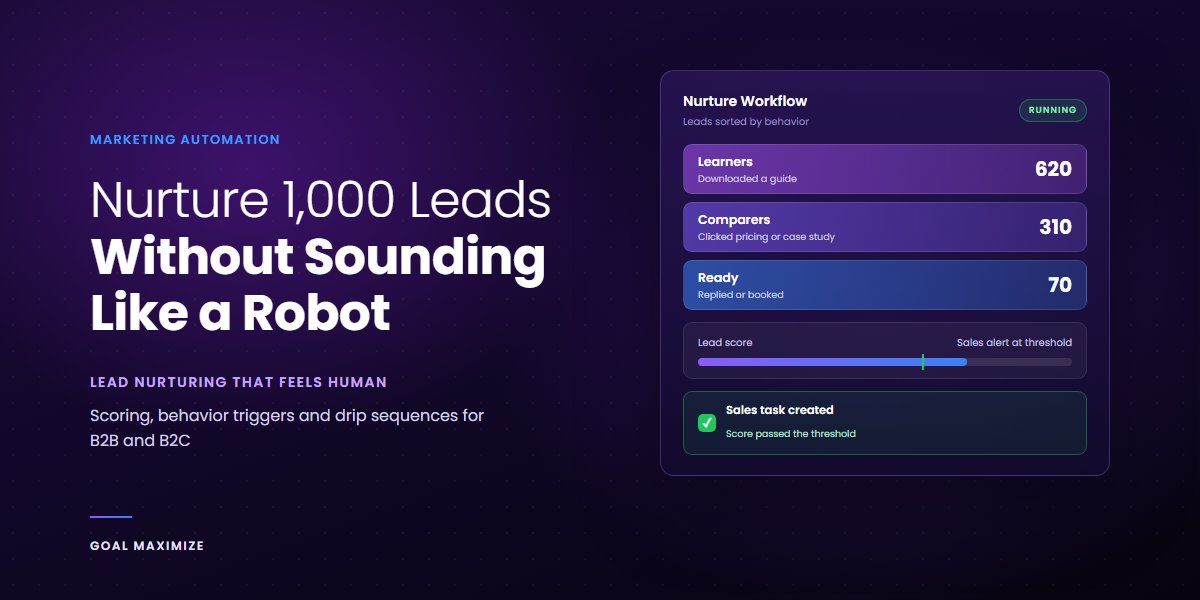
Job title tells you who someone is. Behavior tells you what they want right now, and that is what a good email answers. Start with 3 segments, not 30:
- Learners grabbed a guide or read a post. They want help, not a pitch.
- Comparers opened a case study, clicked a pricing link or visited a service page. They are weighing you against someone else.
- Ready replied, booked or asked a direct question. A person should contact them today.
Tag every lead with the offer that captured them. Someone who downloaded a checklist and someone who asked for a quote should never get the same second email. If your offers are weak, fix that first with our guide to lead magnets that actually get downloaded.
Step 3: Build Behavior Triggers That Act Like a Person Would
A trigger is a rule that fires when a lead does something. Good email automation uses a handful of them, each with a clear reaction:
- Clicks a pricing link: move them to Comparers and alert sales.
- Visits the pricing page twice in a week: send a short, plain-text note from a named person.
- Downloads a second resource: skip the basics in the next email.
- No clicks in 30 days: send one re-engagement email, then slow the cadence.
Trigger on clicks and page visits, not on opens. Apple Mail’s privacy feature preloads email content, which can register an open even when nobody read the message. A click comes from a real person in a browser.
Give leads time to act. Mailchimp’s conditional split guidance recommends a delay of at least 4 hours before any split that checks for a click on an earlier email.
Step 4: Score Leads So Sales Hears About the Right 50
With 1,000 leads, your sales team cannot call everyone, and they should not try. Lead scoring gives each lead a number so the warm ones surface on their own. HubSpot’s lead scoring tool splits the number in 2: a fit score based on properties like job title or company size, and an engagement score based on actions like website visits or email clicks. It can also reduce points over time, which it calls score decay. Details are in HubSpot’s lead scoring documentation.
Here is a starter model. These point values are examples we use as a starting draft, not industry standards. After 90 days, compare them against which leads actually became customers and adjust.
| Signal | Type | Example points |
|---|---|---|
| Job title matches your buyer | Fit | +15 |
| Company size in your target range | Fit | +10 |
| Clicked a nurture email | Engagement | +5 |
| Visited the pricing page | Engagement | +20 |
| Downloaded a second resource | Engagement | +15 |
| Replied to an email | Engagement | +30 |
| No activity for 30 days | Decay | -10 |
Set a threshold, say 60 points, where a lead triggers a task for sales. Everyone below it stays in nurture. One catch on Mailchimp: its 1 to 5 star contact rating counts clicks from regular and A/B test emails only, and activity from automations is not included. So it cannot score a nurture flow. Use tags there, or pair it with a CRM.
Step 5: Use Dynamic Content So One Email Feels Like Five
Dynamic content means 1 email with blocks that change per reader. You write 1 template and get several versions. Use it where it changes the meaning of the message:
- Swap the case study to match the lead’s industry.
- Change the call to action: a guide for Learners, a booking link for Comparers.
- Mention the specific resource they downloaded.
“Hi {first name}” is not personalization. Everyone has seen it. Referring to the checklist they downloaded on Monday is. Mailchimp’s dynamic content works from audience fields, groups and tags, with up to 10 conditions per block. ActiveCampaign calls its version conditional content, and HubSpot uses personalization tokens that pull from contact properties. Always write a default for contacts who match no rule.
Step 6: Write the Drip Sequences
A drip sequence is a planned set of emails sent over days or weeks. Keep each one to 1 idea and 1 link, and send it from a real name. These are 2 examples you can copy.
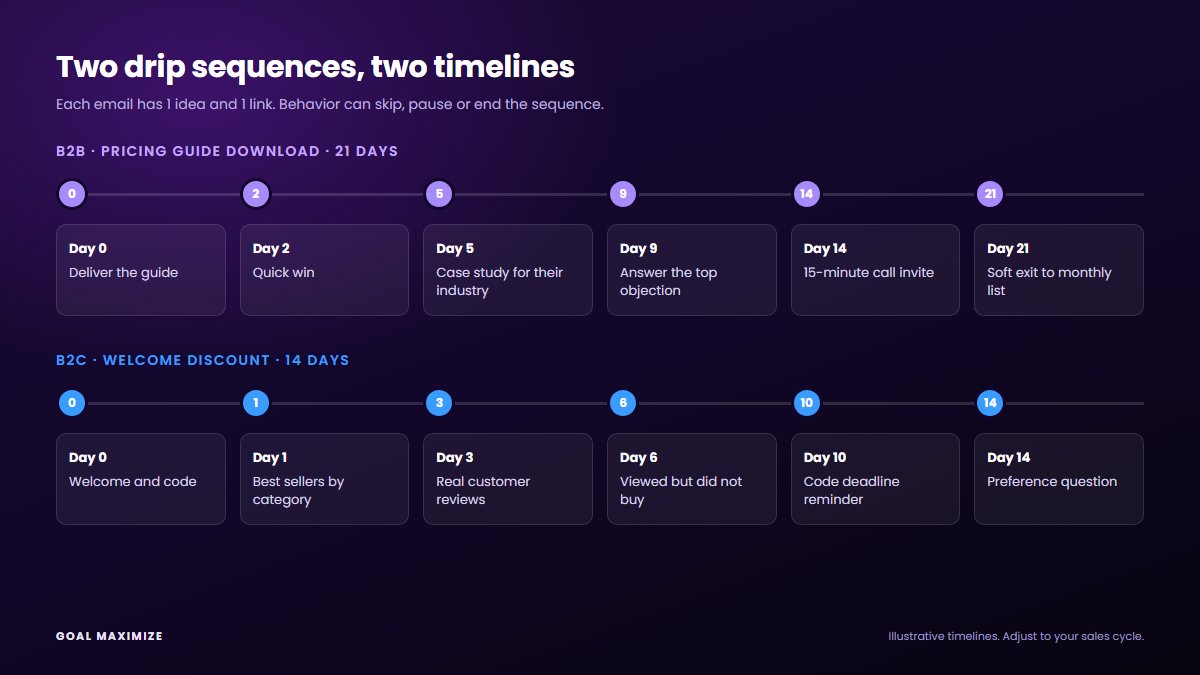
B2B example: a lead who downloaded a pricing guide
| Day | Purpose | What it says |
|---|---|---|
| 0 | Deliver | The guide, plus 1 line on how to use it |
| 2 | Quick win | 1 tip from the guide they can apply in 10 minutes |
| 5 | Proof | A short case study matched to their industry (dynamic block) |
| 9 | Objection | Answer the question buyers ask most, usually cost or switching effort |
| 14 | Ask | Invite them to a 15-minute call. If they visited pricing, alert sales instead |
| 21 | Soft exit | “Not now? Here is what I would do first.” Move them to a monthly update |
B2C example: a shopper who joined for a welcome discount
| Day | Purpose | What it says |
|---|---|---|
| 0 | Welcome | The discount code and a 3-line guide to choosing |
| 1 | Best sellers | Products picked by the category they browsed (dynamic block) |
| 3 | Reviews | 2 real customer reviews of the product they viewed |
| 6 | Nudge | Only if they viewed a product and did not buy: a reminder for that item |
| 10 | Deadline | Code reminder, only if the code really expires |
| 14 | Ask | A preference question that sorts them into a segment |
Leads who stay quiet after the last email do not need another. Move them to a lighter monthly list, or reach them again through retargeting and remarketing ads.
HubSpot vs ActiveCampaign vs Mailchimp for Nurturing
All 3 can run the steps above. They differ in how much logic you can build and what each plan includes. This table uses each vendor’s own help pages as of October 2026. Plans change, so confirm on the vendor’s pricing page before you buy.
| Tool | Triggers | Scoring | Dynamic content |
|---|---|---|---|
| HubSpot | Workflow enrollment by filter, event, schedule or webhook | Lead scoring tool with fit, engagement or combined scores. Needs Marketing Hub Professional or Enterprise | Personalization tokens from contact properties |
| ActiveCampaign | “Web page is visited” with site tracking, plus tag triggers | Contact scoring with rules that add or subtract points | Conditional content in the email designer |
| Mailchimp | Automation flows with conditional splits, up to 5 conditions per branch | Star rating from regular and A/B email clicks only | Dynamic content by field, group or tag. Standard plan or higher |
Our take: choose HubSpot if your sales team already lives in a CRM and you sell B2B. Choose ActiveCampaign if you want detailed behavior rules and scoring inside the email tool. Choose Mailchimp to start simple with a small list, and accept that you will tag manually. One ActiveCampaign detail: page visits only count once the contact is identified, usually through a form submission or a click on one of your email links.
What to Measure
Track these 4 each month:
- Replies per 100 emails sent. Replies are the clearest sign the tone sounds human.
- Leads reaching your score threshold. If it is near zero, the threshold or the content is off.
- Sales-accepted rate. Of the leads you pass to sales, how many does sales say are worth a call?
- Unsubscribes and spam complaints. A rising trend means you are sending too often or to the wrong people.
For the wider set of numbers to put on a dashboard, see our list of digital marketing KPIs every business owner should track.
5 Mistakes That Make Automation Sound Like a Robot
- One sequence for everyone. Three segments beat one list.
- Fixed delays that ignore behavior. If a lead books a call on day 3, stop the sequence.
- A “noreply” sender. Send from a named person and read the replies.
- Several calls to action per email. Pick 1.
- No exit. Every sequence needs an end, or it becomes background noise.
Your Next Move
You do not need all of this live on day 1. Start with Steps 1 to 3 and one sequence, then add scoring once you have 60 to 90 days of click data. For a done-for-you build, our sales lead generation services and email marketing services cover the setup. You can also talk to our team about your list.

**Shalini Thakur** is an SEO Specialist at Goal Maximize with 9+ years of experience in technical SEO, content strategy, and AI-powered search optimization. Specializes in data-driven SEO strategies, website optimization, content development, and adapting websites to the evolving AI-powered search landscape.