
Website Design & Development
A landscaping company in Charlotte paid $18,400 for a website redesign last spring. Custom photography, scroll animations, the works. Looked stunning in the agency’s portfolio presentation. Problem was, the homepage took 7.1 seconds to load on a phone, the “Request a Quote” button sat below 3 full screens of content nobody scrolled past, and the contact form asked for 9 fields including “How did you hear about us?” before anyone could actually submit. Their monthly leads went from 43 to 19. Nearly cut in half. The old site, built on a $79 template in 2019, had been quietly outperforming this $18,400 rebuild the entire time.
I bring this up because it captures the single biggest misunderstanding about website design and development. Businesses treat it like buying furniture. You pick something that looks right, pay for it, and you’re done. But a website isn’t a purchase. It’s an operating system for your revenue. Every page is either pulling prospects closer or pushing them away, and most of the factors that determine which way it goes have nothing to do with how pretty the thing looks.
This guide covers the pieces that actually matter when you’re building or rebuilding a business website. UI and UX (not the same thing, and the difference costs people money). CMS platforms and why the wrong choice can trap you for years. Ecommerce builds that sell versus ones that just display products. The role graphic design plays beyond your logo. And the part nobody wants to talk about: what all of this really costs, and where businesses waste the most money. If you’re also sorting out how your website fits into your broader digital marketing, that context matters here too, because a site built in isolation from your marketing channels almost always underperforms one that’s built alongside them.
UI/UX Web Design: The Part That Makes or Loses You Money
People conflate these two constantly. UI design is the visual layer. The buttons, the colors, the spacing between elements, the fonts, the way your navigation menu looks. UX design is the logic underneath. Can a first-time visitor figure out what you do in 5 seconds? Can they find your pricing page without clicking through 3 dropdowns? Does your mobile layout actually work with a thumb, or did someone just shrink the desktop version and call it responsive?
The visual stuff matters, obviously. Visitors form gut reactions to a website in about 50 milliseconds, which is genuinely faster than conscious thought. But the thing that determines whether those visitors convert into leads or customers isn’t the color of your hero section. It’s whether the UI/UX design removes friction or creates it.
Here’s what friction looks like in practice. A navigation bar with 14 top-level items. A homepage with 3 competing calls to action above the fold. Contact forms that demand a phone number, company size, annual revenue, and project timeline before you’ve earned any trust at all. Auto-playing video that eats 4 seconds of load time on cellular connections. Pop-ups that cover the content before anyone has read a word.
None of those are edge cases. I see all 5 on business websites every single week. And the owners usually don’t know they’re hemorrhaging visitors because they never look at the analytics. They just know the phone isn’t ringing as much as they expected.
The Mobile Problem Is Worse Than You Think
Somewhere around 63% of Google searches happen on phones now. Not tablets. Phones. 6-inch screens with thumbs doing all the work. And yet, a shocking number of business websites in 2026 still treat mobile as an afterthought. The buttons are 28 pixels wide (your thumb covers about 44 pixels, for reference). The text requires pinch-zooming. Images that look crisp on a monitor take 5 seconds to load over LTE because nobody compressed them.
If your site doesn’t work properly on a phone, you’re not losing “some” visitors. You’re losing the majority. That isn’t an exaggeration. Look at your Google Analytics device breakdown. For most B2C businesses, mobile traffic is 60-75% of total visits. For B2B it’s usually 45-55%. Either way, it’s too much to ignore.Website DesWebsite Design & Development
CMS Development: Choosing the Platform That Won’t Lock You In
Your content management system is the foundation. Get it right and your team can update pages, publish blog posts, add new service listings, and make changes without calling a developer every time. Get it wrong and you’re paying someone $150 an hour to change a phone number on your contact page.
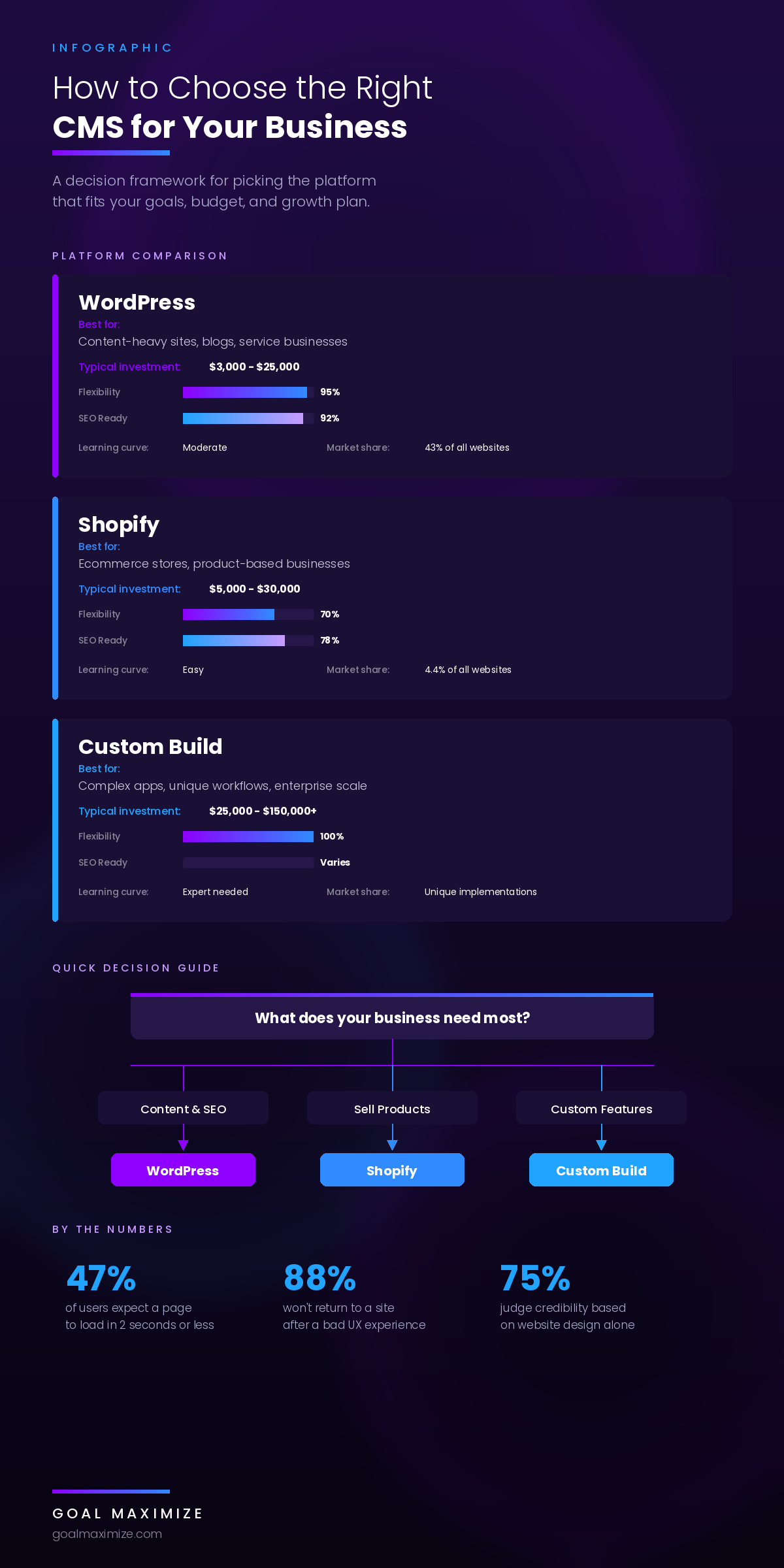
There are really only 3 paths for most businesses, and each one involves trade-offs that agencies don’t always explain upfront.
WordPress
WordPress runs about 43% of all websites on the internet. Not 43% of blogs. 43% of all websites. That dominance exists for a reason: the platform is flexible enough to handle a 6-page brochure site for a local plumber and a 50,000-page content operation for a media company. The plugin ecosystem is massive. The developer talent pool is deep. And when it’s set up properly on decent hosting, WordPress sites load fast and rank well in search.
The catch is maintenance. WordPress needs plugin updates, PHP version updates, security monitoring, and periodic database optimization. Ignore that stuff for 18 months and you’ll end up with a slow, vulnerable site that’s a pain to fix. You either need someone on your team who’s comfortable managing the backend, or you need a CMS development partner who handles the upkeep.
For service businesses, professional firms, B2B companies, and anyone who plans to invest seriously in content marketing and SEO, WordPress is almost always the right call. The flexibility-to-cost ratio over 3-5 years beats everything else.
Shopify
If you sell products, Shopify does the heavy lifting well. Payment processing, inventory tracking, shipping calculations, tax compliance, storefront templates. It’s a purpose-built ecommerce machine, and the checkout experience converts better out of the box than most custom solutions.
But Shopify’s strengths are also its boundaries. You don’t control the hosting. Customization beyond their template system requires a developer who knows Liquid (Shopify’s proprietary templating language, which has a smaller talent pool than WordPress/PHP). Transaction fees stack on top of your payment processor’s fees unless you exclusively use Shopify Payments. And the blogging and content marketing tools are basic at best. If your business needs a serious content library alongside your store, you’ll feel the limitations within a year.
Going Custom
Custom-built sites using React, Next.js, Laravel, or similar frameworks make sense in exactly one scenario: your business needs functionality that no existing platform handles adequately. Multi-sided marketplaces. Complex booking systems with 40 variables. Proprietary tools that tie directly into internal databases. If you’re building something that doesn’t exist yet, custom is the path.
For everyone else, custom is a trap. These projects start around $25,000 and frequently balloon past $100,000. They take 4-9 months. And the real cost isn’t even the build. It’s the dependency. You are permanently tied to whatever team wrote the code. If that team raises their rates, gets acquired, or disappears, you’re sitting on a codebase that a new developer needs months to understand before they can change anything. Only go custom when you’ve genuinely exhausted what WordPress and Shopify can do. That bar is higher than most agencies will tell you.
Ecommerce Web Development: Why Most Online Stores Underperform
Building an online store isn’t the same as building a website that happens to have a shopping cart. The disciplines are different. Product photography that actually sells (lifestyle shots beat white-background cutouts almost every time). Descriptions that rank in search AND persuade a buyer in the same paragraph. A checkout flow specifically engineered to reduce the 68-72% of shoppers who abandon their carts before completing a purchase.
That abandonment number isn’t a typo and it isn’t new. It’s been stubbornly consistent for over a decade. The reasons are predictable: surprise shipping costs that show up at the last step, mandatory account creation before checkout, too many form fields, not enough trust signals (return policies, security badges, real customer reviews), and pages that take too long to load on mobile. Professional ecommerce development addresses each of those friction points before launch, not after the sales data looks disappointing.
What Actually Separates Stores That Sell
The stores generating serious revenue do a few things differently, and none of them are complicated once you see them.
Product pages are built around the buyer’s problem, not the manufacturer’s spec sheet. Instead of “304 stainless steel construction, 18/10 chromium-nickel composition,” the copy says “won’t rust, dent, or stain after 500 dishwasher cycles.” Category pages have filters that actually narrow results meaningfully. Someone browsing 180 products can get to the 4 that match their size, color, and budget inside 2 clicks. The search bar works. (You’d be amazed how many ecommerce sites have broken or useless search.)
And none of it matters if nobody finds the store in the first place. You need traffic, which means you need either organic search visibility, paid advertising, or both. Understanding whether SEO or PPC delivers better ROI for your specific products is a conversation worth having before you spend $30,000 on a beautiful store that gets 11 visitors a day.
Graphic Design: The Trust Layer Nobody Talks About
Most businesses put real effort into their logo and then treat every other visual element like a checkbox. Icon sets are grabbed from free libraries. Photography is stock. The about page uses a different visual language than the homepage. The blog looks like it belongs to a completely different company.
This inconsistency costs more than people realize. Graphic design across your website isn’t decoration. It’s a trust signal. When every page shares the same color application, button styles, typography treatment, and photography approach, visitors subconsciously register the business as established and professional. When those elements are inconsistent, visitors notice something feels off. They usually can’t articulate what’s wrong. They just don’t trust it. And they leave.
This hits service businesses especially hard. You’re not selling a physical product someone can hold and evaluate. You’re selling expertise and a promise. Your visual design is doing heavy persuasion work because it’s the most tangible thing a prospect can judge before picking up the phone. A sloppy visual layer tells them you cut corners. Whether that’s fair or not doesn’t matter. That’s the conclusion they draw.
Website Performance, Core Web Vitals, and Why Speed Equals Revenue
Google has been explicit about this for years now. Core Web Vitals, the page experience metrics Google uses as ranking signals, measure exactly 3 things: how fast your main content appears (Largest Contentful Paint), how quickly the page responds when someone taps or clicks something (Interaction to Next Paint), and how much the layout jumps around while loading (Cumulative Layout Shift). These directly affect where you show up in search results.
But rankings aside, the revenue impact of site speed is mathematical. A page that loads in 1.8 seconds converts at a measurably higher rate than the same page loading in 4.3 seconds. Research consistently shows each additional second of load time drops conversions by 7-12%. On a site generating $500,000 a year, cutting 2 seconds off your load time could recover $35,000-$60,000 in revenue you’re currently losing to impatient visitors who bounce. That’s not theory. It’s arithmetic.
The annoying part is that performance isn’t a one-time fix. Every image your marketing team uploads, every plugin you install, every chat widget and analytics script and retargeting pixel adds weight. Smart businesses treat performance like a monthly checkup. Run a Lighthouse audit against Google’s Core Web Vitals benchmarks, identify what slowed down since last month, and fix it before it compounds. If you’ve never run one on your site, do it today. The results tend to be sobering.
What This All Actually Costs (Real Numbers)
Every agency says “it depends” and then dodges the question. It does depend. But here are honest ranges based on what businesses actually pay in 2026, not what agencies wish they could charge.
| Project Type | Realistic Range | Timeline | Who It’s For |
|---|---|---|---|
| Template-based site | $2,500 – $8,000 | 2 – 4 weeks | Startups, solo practices, local shops |
| Custom WordPress build | $8,000 – $35,000 | 6 – 14 weeks | Growing companies, professional services, B2B |
| Ecommerce store | $12,000 – $55,000 | 8 – 18 weeks | Product brands, DTC, wholesale-to-retail |
| Custom web application | $25,000 – $150,000+ | 3 – 9 months | SaaS, enterprise platforms, marketplaces |
| Full rebrand + redesign | $18,000 – $80,000 | 10 – 24 weeks | Established businesses changing direction |
Those numbers cover the build. They don’t cover the stuff you’ll also need to pay for: hosting ($35-$300 a month depending on traffic and platform), maintenance and security updates ($1,200-$5,000 a year), content production for SEO (which most budgets pretend doesn’t exist), and future development work as your business evolves and the site needs to keep up.
Here’s the thing that trips up budget-conscious buyers: the cheapest build is almost never the cheapest option over 3 years. A $3,500 template site that needs a complete rebuild at month 18 because it can’t handle your growth costs more than a $14,000 custom build that scales with you. Think in total cost of ownership, not sticker price.
How Your Website Plugs Into Everything Else
Your website isn’t a standalone asset. It’s the hub that every other marketing channel feeds into and feeds from. Your SEO strategy lives on it. Your ad campaigns send people to it. Your email marketing drives clicks back to it. Your social profiles link to it. When the hub is broken, every channel underperforms.
The expensive mistake businesses make is hiring one team for the build and a separate team for marketing, and those two teams never have a real conversation. The result is a site that looks polished but isn’t structured to convert paid traffic. Or landing pages that load slowly, don’t match the ad copy, and lack clear next steps. Or a blog architecture that makes it nearly impossible to rank for the keywords the SEO team cares about.
The fix is simple in concept: treat the website and the marketing as one system. Your KPIs should connect what happens on the site to actual business outcomes, not just pageviews. Your page architecture should reflect your keyword targets. Your service pages should convert both organic visitors who found you through Google and paid visitors who clicked an ad. When development and marketing are aligned, the decisions compound. When they’re siloed, you waste money on both.
Red Flags When You’re Evaluating Web Design Services
Not every agency that calls itself a web design company can actually build a site that performs. The worst ones are fantastic at selling and terrible at delivery. A few warning signs to watch for before you sign a contract.
They can’t show you live websites they’ve built. Not mockups or screenshots. Live, functioning sites you can visit and test on your phone right now. If they can’t produce those, they’re either too new to have a track record or too embarrassed by their previous work to share it. Both are problems.
They promise Google rankings as part of a web design proposal. Building a site and ranking it in search are 2 different disciplines with 2 different timelines. A good web design creates the foundation for SEO. But ranking requires ongoing content, link building, and technical optimization that extends far beyond launch day. An agency that bundles vague ranking guarantees into a design quote is either oversimplifying or misleading you.
They build on proprietary platforms you can’t take with you. If you can’t export your site and move it to another host or another developer, you don’t own your website. You’re renting it. Make sure you own the code, the design files, and the content outright.
A good agency pushes back. They tell you the mega-menu your VP of sales wants is going to confuse visitors. They challenge the autoplay video that adds 4 seconds to mobile load time. They ask about your analytics, your sales process, and your competitors before sketching a single wireframe. If the agency just nods along to everything you say, they’re building what you asked for, not what your business needs. Those are often very different things.
For a deeper framework on evaluating potential partners, these 10 questions to ask before signing with an agency will save you from the most common hiring mistakes.
Rebuild or Redesign: How to Decide
Not every problem requires burning it all down and starting fresh. Sometimes a targeted redesign of 4 or 5 key pages produces better results than a ground-up rebuild at a third of the cost.
You probably need a full rebuild if your site runs on a platform that’s no longer updated (looking at you, Joomla holdouts). Or if your site architecture physically can’t support new sections or content types. Or if every small change requires a developer because the codebase has accumulated so many patches and workarounds that nobody can modify it efficiently anymore. Or if the whole thing was built 7+ years ago and hasn’t had a significant update since.
A targeted redesign works when the foundation is solid but the surface is dated. High-traffic pages with poor conversion rates. A mobile experience that needs serious improvement. Service pages that look tired but structurally work fine. Blog templates that need a refresh but don’t need to be scrapped.
The deciding factor is usually analytics. If your highest-traffic pages have bounce rates above 65% and session durations under 40 seconds, the problem is likely design and UX, which a redesign can fix. If your site literally cannot do what your business requires (you need appointment booking but your CMS doesn’t support it, or you need ecommerce but you’re on a platform that doesn’t handle transactions), that’s a platform limitation. You rebuild.
Make Your Website Earn Its Keep
A properly built website should be the hardest-working asset in your business. It operates around the clock, handles hundreds of conversations at once, never takes a sick day, and if someone built it with actual strategy behind the design, it gets more effective over time as you add content and optimize based on real data.
But that only happens when someone made deliberate, informed decisions about UI, UX, platform, performance, and how every piece ties back to the marketing channels bringing people through the door.
If your current site isn’t generating the leads you expected, isn’t showing up in search results, or isn’t turning visitors into customers, those are solvable problems. And every month you leave them unsolved is revenue you’re handing to competitors whose websites do work.
Talk to Goal Maximize about website design and development that’s built around what your business actually needs, not what looks best in a pitch deck.

**Shalini Thakur** is an SEO Specialist at Goal Maximize with 9+ years of experience in technical SEO, content strategy, and AI-powered search optimization. Specializes in data-driven SEO strategies, website optimization, content development, and adapting websites to the evolving AI-powered search landscape.